


Introduction: Why Distributors Need P21 Magento Integration Now
Most distributors run their operations on Epicor Prophet 21 (P21) because it handles inventory, pricing, purchasing, and customer management reliably. At the same time, they use Magento as their ecommerce platform because it gives them flexibility, customizations, and strong B2B features.
But when these two crucial systems don’t talk to each other, distributors face a long list of problems—wrong prices, missing orders, outdated stock, and frustrated customers. Every issue creates extra work for operations, IT, and customer service teams.
In 2026, B2B buyers expect:
- Live inventory
- Real-time accurate pricing
- Easy reorder tools
- Fast order updates
- Instant availability checks
Without a proper P21 Magento Integration, meeting these expectations becomes extremely difficult.
This blog explains everything distributors need to know—from why integration matters, to real examples, to benefits, to People Also Ask answers. By the end, you will clearly understand how P21 and Magento can work together to transform your digital operations.
What Is P21 Magento Integration?
P21 Magento Integration is the process of connecting your Epicor Prophet 21 ERP with your Magento ecommerce platform so both systems share data automatically.
Instead of updating products, prices, and inventory in two places manually, integration syncs them in real time.
What Data Syncs Between P21 and Magento?
A well-built integration synchronizes:
Product Information
- SKU
- Description
- Long attributes
- Categories
- Images
- Specs
- Units of Measure
- Part replacements / alternates
- Manufacturer cross-references
Pricing
- Customer-specific pricing
- Contract pricing
- Discount matrices
- Tiered pricing
- Margin rules
- MAP pricing
Inventory
- Real-time stock
- Warehouse-specific quantities
- Backorder status
Orders
- Magento order → P21 sales order
- Payment details
- Tax & shipping method
- Coupon and promo codes
Customer Data
- Customer accounts
- Address books
- Company structures
- Credit limits and terms
- Order history
Shipping
- Tracking number
- Shipment status
- Carrier information
This makes your ecommerce store accurate, always updated, and ready for B2B customers’ expectations.
Why P21 Magento Integration Matters for Modern Distribution
Buyers Expect Real-Time Information
Today’s B2B buyers behave like B2C customers—they want the same speed, accuracy, and ease-of-use. They expect:
- The correct price for their account
- Instant stock visibility
- Order tracking without calling customer service
- Faster checkouts
- Access to past invoices and orders
When you rely on manual updates, accuracy becomes impossible.
Manual Processes Slow Teams Down
Most distributors still:
- Export product data from P21
- Clean it in Excel
- Import it into Magento
- Update inventory through spreadsheets
This creates:
- Delays
- Human error
- Mismatched data
P21 Magento Integration automates all of this.
It Creates a Scalable Foundation
When your data flows smoothly:
- Adding new products becomes faster
- Launching new ecommerce stores becomes simpler
- Expanding into new regions is easier
- Your team spends more time selling, not fixing mistakes
For deeper insights, refer to our earlier blog here: B2Sell Magento P21 Integration: Best Practices in 2026
Challenges Distributors Face Without P21 Magento Integration
1. Incorrect Pricing for Customers
Distributors often use complex pricing structures in P21:
- Contract pricing
- Margin-based rules
- Customer-specific discounts
- Volume and tier pricing
Without integration, Magento can't reflect these prices correctly.
Result?
Customers see the wrong price, get frustrated, and call support—or abandon the cart entirely.
2. Outdated Inventory Levels
Stock changes constantly in a distribution business.
Without real-time sync:
- Magento sells items you don’t have
- Customers place orders that turn into backorders
- Support teams handle complaints all day
This damages trust and increases costs.
3. Manual Order Entry Creates Errors
When Magento orders are manually entered into P21:
- Quantities are entered wrong
- Pricing doesn’t match
- Line items get missed
- Shipping delays occur
- Invoices go out late
Operations teams waste countless hours fixing data.
4. Inconsistent Product Data Across Systems
Distributors sell complex, spec-heavy products.
Managing:
- Attributes
- Images
- Manufacturer data
- Technical sheets
…becomes impossible without automation.
5. Slow Customer Service
When P21 and Magento do not sync:
- Customers can’t see their order history
- Sales reps can’t track online orders
- Reorder processes slow down
- Customer service spends hours answering simple questions
6. Poor Online Buying Experience
Distributors lose customers because:
- Search doesn’t show the right products
- Prices look incorrect
- Inventories appear wrong
- Checkout feels slow
Integration solves all these problems and modernizes your sales experience.
How P21 Magento Integration Works
Here’s how the data flows between both platforms:
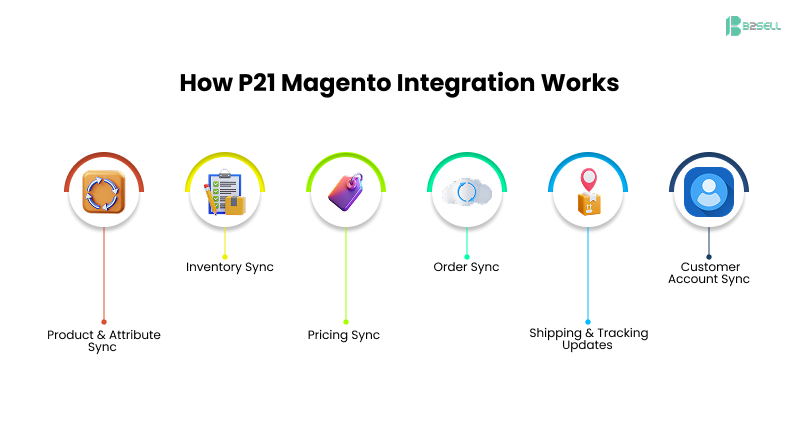
1. Product & Attribute Sync
Data moves from P21 → Magento
Magento gets updated effortlessly with:
- Product names
- Assigned categories
- Feature attributes
- Compatibility data
- Alternatives & replacements
- Price units
This ensures the ecommerce store always reflects ERP truth.
2. Inventory Sync
Real-time inventory sync ensures:
- Accurate stock
- Multi-warehouse support
- Automatic status updates
This helps Magento show:
- In-stock
- Out-of-stock
- Backorder availability
- Next restock date
3. Pricing Sync
This is the most critical piece for distributors.
P21 → Magento pricing sync includes:
- Customer-specific pricing
- Complex discount rules
- Contract pricing
- Multi-level pricing logic
Magento displays correct prices only for logged-in customers.
4. Order Sync
Magento → P21
The entire order flows automatically:
- Customer details
- Order items
- Shipping method
- Payment confirmation
- Tax info
P21 processes the order immediately.
5. Shipping & Tracking Updates
P21 → Magento
After an order is fulfilled:
- Tracking numbers sync
- Shipment status updates
- Email notifications trigger
Customers can track orders without calling support.
6. Customer Account Sync
Bidirectional sync enables:
- Reorders
- Saved carts
- Past invoices
- Quote-to-order conversions
- Multiple shipping addresses
These features matter deeply to B2B buyers.
Step-by-Step Guide: How Distributors Integrate P21 with Magento
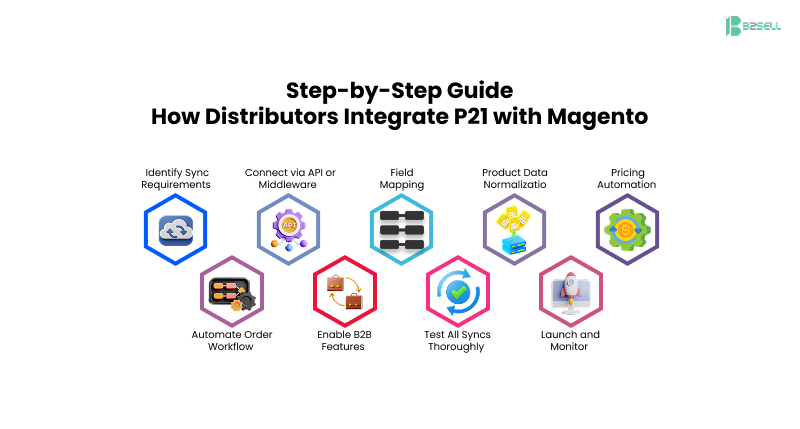
Step 1: Identify Sync Requirements
Document:
- What data needs mapping
- How often sync should run
- Which fields are priority
Step 2: Connect via API or Middleware
A platform like B2Sell Integration Hub simplifies:
- Authentication
- API rate limits
- Error handling
- Queue management
Step 3: Field Mapping
Map fields such as:
- P21 Item Number → Magento SKU
- P21 Customer Number → Magento Customer ID
- P21 Price Matrix → Magento Customer Groups
- P21 Inventory Warehouse → Magento Stock Source
This ensures data consistency.
Step 4: Product Data Normalization
Before syncing:
- Fix attributes
- Standardize images
- Correct descriptions
- Cleanup categories
This improves search and conversions.
Step 5: Pricing Automation
Configure:
- Discount logic
- Contract pricing
- Multi-currency
- Customer-specific pricing
Magento shows the exact P21 pricing.
Step 6: Automate Order Workflow
Every Magento order automatically becomes a P21 sales order.
This improves:
- Order accuracy
- Processing speed
- Invoicing time
Step 7: Enable B2B Features
Add support for:
- Quotes
- Credit limits
- PO number fields
- Quick order pads
- Saved lists
- Bulk ordering
Step 8: Test All Syncs Thoroughly
Test:
- Pricing accuracy
- Inventory changes
- Customer login logic
- Order flow
- Tracking
Step 9: Launch and Monitor
Check:
- API load
- Sync speed
- Customer behavior
- Admin reports
Integration becomes the backbone of operations.
Realistic Use Cases for Distributors
Use Case 1: Industrial Parts Distributor
Problem: 20,000+ SKUs updated manually every week.
Result: Integration reduced update time from 8 hours/day to under 15 minutes.
Use Case 2: Electrical Supply Distributor
Problem: Contract pricing not visible online.
Result: Customer-specific pricing sync increased repeat orders by 38%.
Use Case 3: HVAC Distributor
Problem: Manual order entry caused 100+ order errors/month.
Result: Automated Magento → P21 order sync reduced errors by 92%.
Use Case 4: Building Materials Distributor
Problem: No visibility into inventory across warehouses.
Result: Real-time inventory sync improved fulfillment accuracy by 27%.
Use Case 5: Safety Products Distributor
Problem: Customers wanted self-service access to past orders.
Result: Customer portal increased online logins by 60%.
Key Benefits of P21 Magento Integration
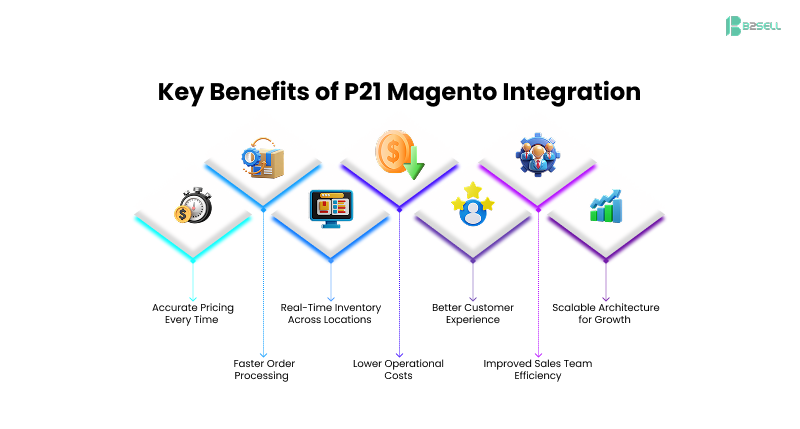
1. Accurate Pricing Every Time
Customers see only their correct price—never the wrong one.
This increases:
- Trust
- Conversions
- Profit margins
2. Faster Order Processing
Orders flow instantly from Magento → P21 → warehouse.
This reduces:
- Delays
- Manual work
- Cost-per-order
3. Real-Time Inventory Across Locations
Customers can see:
- Available stock
- Delivery timelines
- Pickup availability
4. Lower Operational Costs
Teams save hundreds of hours per month previously spent on manual updates.
5. Better Customer Experience
Buyers enjoy:
- Faster checkout
- Accurate pricing
- Easy reorders
- Account-based visibility
6. Improved Sales Team Efficiency
Sales reps can see customer online activity and assist faster.
7. Scalable Architecture for Growth
Your business becomes ready for:
- Multi-warehouse expansion
- Multi-store Magento
- Marketplace channels
- Regional growth
FAQ
Q1. What is P21 Magento Integration?
Featured Snippet:
P21 Magento Integration connects Epicor Prophet 21 with a Magento store to sync inventory, pricing, product data, customers, and orders in real time. It automates data updates and eliminates manual work.
Q2. How does P21 integrate with Magento?
It connects using APIs or middleware to share data such as prices, inventory, customers, and orders. Sync can run in real-time or on a schedule.
Q3. Why do distributors need P21 Magento Integration?
Distributors need integration to provide accurate pricing, real-time inventory, and seamless online ordering. It reduces errors, improves customer experience, and speeds up operations.
Q4. What systems sync during P21 Magento Integration?
The main systems that sync include product catalog, pricing matrices, customers, orders, inventory, and shipping.
Q5. Does Magento support customer-specific pricing from P21?
Yes. Contract pricing, bulk pricing, and customer-specific pricing can sync fully from P21 to Magento.
Conclusion: The Transformation Distributors Can Expect
A strong P21 Magento Integration eliminates manual work and gives distributors a modern ecommerce experience. With real-time pricing, accurate inventory, automated order sync, and account-based features, your customers get the smooth buying journey they expect.
This integration improves:
- Sales
- Accuracy
- Efficiency
- Customer satisfaction
- Scalability
If you want to compete in today’s digital distribution market, integrating P21 and Magento is no longer optional—it’s essential.
Ready to Connect Magento with P21?
B2Sell specializes in P21 Magento Integration and helps distributors automate data sync, improve customer experience, and scale faster.
.png)
.png)
.png)


.png)