


Modern distributors use multiple software systems to manage sales, customers, orders, inventory, and finance. Most companies rely on CRM systems for customer management and ERP systems for business operations.
However, when these systems work separately, businesses face serious problems such as duplicate data, slow order processing, and poor visibility into customer information.
This is where CRM ERP integration becomes essential.
CRM ERP integration connects your CRM platform with your ERP system so that data flows automatically between both systems. This allows sales, finance, operations, and customer service teams to work with the same real-time information.
For distributors and B2B companies, integrating CRM and ERP improves efficiency, reduces manual work, and delivers better customer experiences.
In this guide, we will explain:
- What CRM ERP integration is
- Why distributors need ERP and CRM integration
- Key challenges businesses face
- Real-world examples of integrating ERP and CRM
- Benefits of ERP CRM integration
- Best solutions for integrating ERP and CRM data
- How B2Sell CRM ERP integration helps distributors
What is CRM ERP Integration?
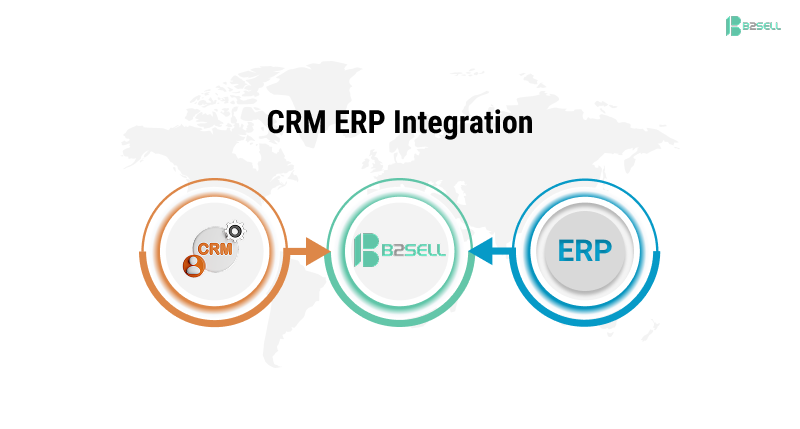
CRM ERP integration is the process of connecting Customer Relationship Management (CRM) software with Enterprise Resource Planning (ERP) systems so data automatically syncs between them.
This integration allows businesses to:
- Share customer data between departments
- Automatically transfer sales orders
- Sync inventory and product data
- Track payments and invoices
- Improve business visibility
By integrating ERP and CRM, companies create a single source of truth for business data.
CRM vs ERP: Understanding the Difference
Before discussing ERP and CRM integration, it is important to understand how each system works individually and why they are both essential for business operations.
What is a CRM System?
A Customer Relationship Management system helps businesses manage interactions with customers and prospects. It focuses primarily on improving sales performance and customer engagement.
CRM systems typically manage the following:
- Lead generation and tracking
- Sales pipeline management
- Customer communication history
- Contact management
- Marketing campaign tracking
- Customer support interactions
Sales and marketing teams rely heavily on CRM platforms to manage opportunities and maintain strong customer relationships.
What is an ERP System?
An Enterprise Resource Planning system is designed to manage internal business processes and operational workflows.
ERP systems typically manage:
- Inventory management
- Order processing
- Financial accounting
- Supply chain operations
- Procurement management
- Manufacturing workflows
ERP platforms are commonly used by operations, finance, and logistics teams to ensure smooth internal business processes.
Why CRM ERP Integration Matters for Distributors
Distributors operate in complex environments where multiple departments must collaborate.
Sales teams generate orders, warehouse teams manage inventory, and finance teams handle payments. Without CRM and ERP integration, these teams often work with disconnected data.
This causes several problems.
Common problems distributors face:
- Sales teams cannot see real-time inventory
- Orders must be manually entered into ERP
- Customer data is duplicated across systems
- Finance teams receive delayed sales information
- Customer support cannot access order history
These problems slow down business growth.
When companies integrate CRM and ERP systems, they eliminate these challenges and improve operational efficiency.
Key Challenges Without CRM ERP Integration
Many distributors still operate with disconnected systems. This creates operational challenges that affect productivity and customer satisfaction.
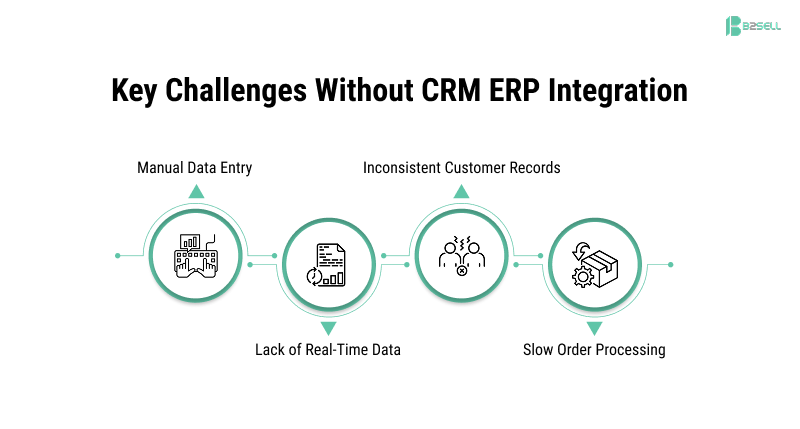
1. Manual Data Entry
Sales teams often enter the same information in both CRM and ERP systems.
Examples include:
- Entering customer details twice
- Manually creating orders in ERP
- Updating product data in multiple systems
Manual work increases errors and slows down processes.
2. Lack of Real-Time Data
Without ERP CRM integration, employees rely on outdated information.
For example:
- Sales reps cannot see current inventory levels
- Customer service teams cannot track order status
- Finance teams receive delayed payment updates
This leads to poor decision-making.
3. Inconsistent Customer Records
Customer data may be different in CRM and ERP systems.
Common issues include:
- Duplicate customer profiles
- Incorrect addresses
- Missing order history
This creates confusion across departments.
4. Slow Order Processing
Orders created in CRM often need manual transfer to ERP systems.
This delay can slow down:
- Order fulfillment
- Shipping processes
- Invoice generation
How CRM ERP Integration Works
Understanding how integration of ERP and CRM works helps businesses implement the right solution.
Below is a simple process.
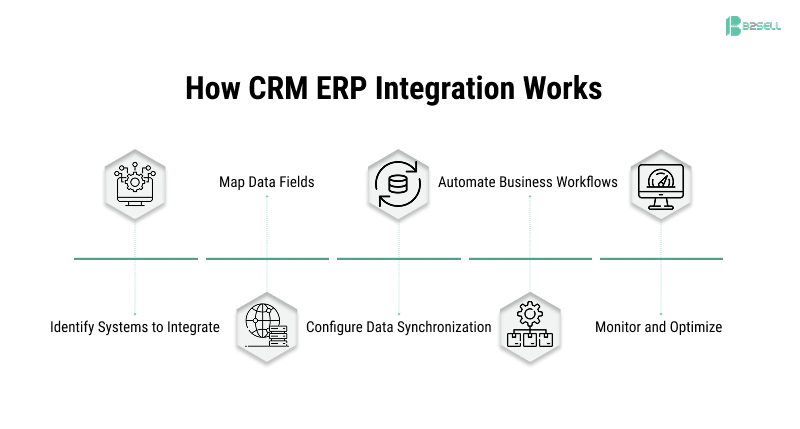
Step 1: Identify Systems to Integrate
The first step is identifying which systems should connect.
Common integrations include:
- CRM platform + ERP system
- Ecommerce platform + ERP
- CRM + ERP + PIM systems
The goal is to create a connected digital ecosystem.
Step 2: Map Data Fields
Businesses must define how data moves between systems.
Examples include:
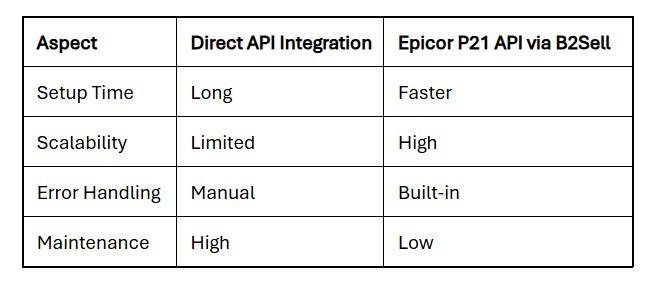
Proper mapping ensures accurate ERP integration with CRM.
Step 3: Configure Data Synchronization
Businesses decide how data should sync between systems.
Common sync rules include:
- Customer creation in CRM updates ERP
- Inventory updates in ERP sync to CRM
- Orders created in CRM automatically enter ERP
- Invoice status updates CRM records
This creates smooth ERP integration with CRM.
Step 4: Automate Business Workflows
Once systems are connected, companies can automate processes.
Examples include:
- Automatic order creation
- Customer record updates
- Shipping status synchronization
- Invoice tracking
Automation improves operational efficiency.
Step 5: Monitor and Optimize
After implementation, businesses monitor integration performance.
They analyze:
- Data accuracy
- System performance
- Workflow efficiency
Continuous optimization ensures long-term success.
Real Examples of CRM ERP Integration
Example 1: Automated Order Processing
A sales rep creates a sales order in CRM.
With ERP CRM integration, the order automatically appears in the ERP system where it triggers:
- Inventory allocation
- Warehouse picking
- Shipping process
- Invoice generation
This eliminates manual order entry.
Example 2: Real-Time Inventory Visibility
Sales teams can view live inventory data inside the CRM.
This allows them to:
- Confirm product availability
- Provide accurate delivery timelines
- Suggest alternative products if stock is low
Example 3: Complete Customer View
When businesses integrate ERP and CRM, they gain a 360-degree view of customers.
Teams can access:
- Purchase history
- Order status
- Payment records
- Customer support interactions
This improves customer relationships.
Benefits of ERP CRM Integration
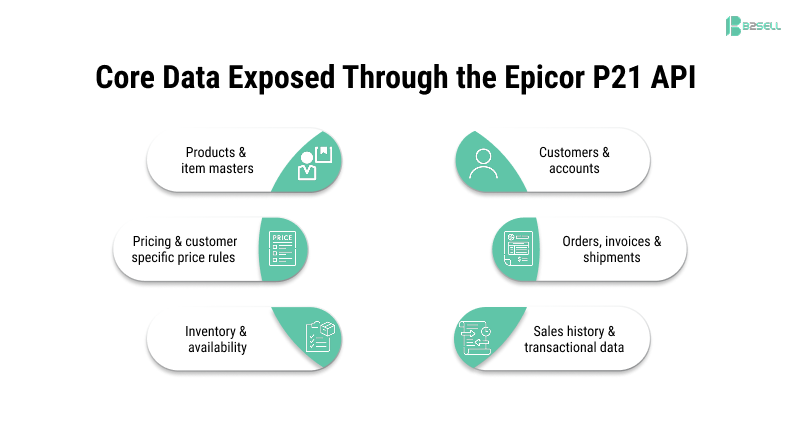
The benefits of ERP and CRM integration extend across every department in an organization. By connecting these systems, businesses can significantly improve efficiency and customer satisfaction.
Below are the most important ERP CRM integration benefits.
1. Elimination of Manual Data Entry
One of the biggest advantages of CRM ERP integration is the removal of repetitive manual processes.
Without integration, employees must manually transfer customer and order information between systems. This wastes time and increases the risk of data entry errors.
Integration automates this process, allowing teams to focus on more strategic tasks.
2. Improved Customer Experience
When CRM and ERP systems share information, customer-facing teams gain access to complete and accurate data.
Sales representatives can quickly view:
- Customer order history
- Payment status
- Shipping updates
- Product availability
This enables businesses to provide faster and more personalized customer service.
3. Better Sales Performance
Sales teams can work more effectively when they have real-time access to operational data.
Through CRM integration with ERP, sales representatives can:
- Generate accurate quotes
- Check inventory instantly
- Track order progress
This reduces delays and helps close deals faster.
4. Real-Time Business Insights
When business data flows seamlessly across systems, leaders gain better visibility into company performance.
Integrated reporting allows organizations to analyze:
- Sales performance
- Inventory trends
- Customer purchasing behavior
- Revenue growth
These insights help companies make informed strategic decisions.
5. Faster Order Processing
Manual order workflows often slow down business operations.
With ERP integration with CRM, the order lifecycle becomes automated:
- Orders move instantly to ERP
- Inventory is updated automatically
- Invoices are generated faster
This significantly improves the order-to-cash cycle.
6. Increased Operational Efficiency
By integrating ERP and CRM systems, organizations streamline communication between departments.
Operations teams, finance teams, and sales teams can collaborate more effectively because they all work from the same data.
Best Solutions for Integrating ERP and CRM Data
Businesses have several options for integrating CRM and ERP.
Custom Integration
Some companies build custom integrations using APIs.
Advantages:
- Full customization
- Complete control
Disadvantages:
- High cost
- Long development time
- Ongoing maintenance
Middleware Integration Platforms
Middleware tools act as connectors between systems.
They simplify integration by:
- Mapping data automatically
- Managing data synchronization
- Supporting multiple systems
This is often the most efficient approach.
Pre-Built Integration Solutions
Modern platforms provide ready-to-use integrations.
These solutions reduce:
- Implementation time
- Development complexity
- Maintenance costs
They are ideal for distributors.
How B2Sell Simplifies CRM ERP Integration
Businesses that want a scalable and efficient integration solution often choose B2Sell integration services.
B2Sell provides advanced integration capabilities that connect CRM systems, ERP platforms, ecommerce platforms, and product information systems.
Learn more about B2Sell integration solutions:
ERP Integration
https://www.b2sell.com/erp-integration
CRM Integration
https://www.b2sell.com/crm-integration
Key Features of B2Sell CRM ERP Integration
B2Sell provides a powerful integration platform designed for modern digital businesses.
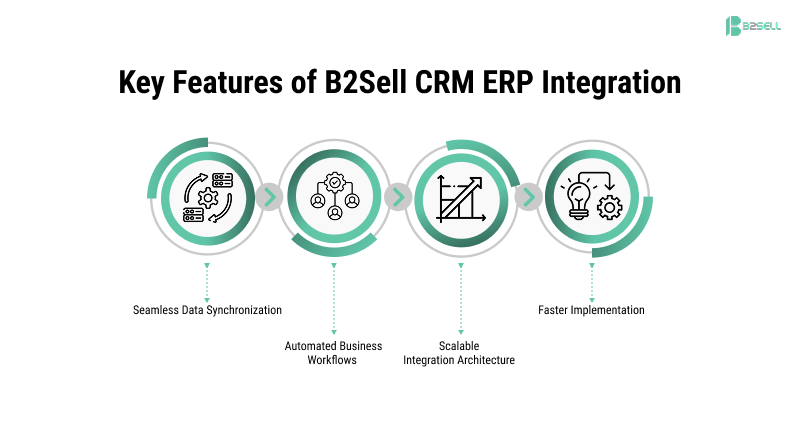
Seamless Data Synchronization
B2Sell ensures real-time synchronization between CRM and ERP systems.
This includes syncing:
- Customer records
- Orders and invoices
- Inventory updates
- Pricing data
Automated Business Workflows
The platform automates complex business processes such as order processing and customer updates.
This reduces manual workload and improves operational efficiency.
Scalable Integration Architecture
B2Sell allows businesses to integrate multiple systems including:
- ERP platforms
- CRM systems
- Ecommerce platforms
- PIM systems
This creates a fully connected digital ecosystem.
Faster Implementation
B2Sell provides flexible integration frameworks that allow businesses to implement CRM ERP integration quickly and efficiently.
FAQ
Can CRM be integrated with ERP?
Yes. CRM systems can be integrated with ERP platforms to allow customer, order, inventory, and financial data to sync automatically between systems.
What are the benefits of ERP and CRM integration?
The main benefits include:
- Faster order processing
- Reduced manual data entry
- Improved customer visibility
- Better business insights
- Increased operational efficiency
Why do distributors need CRM ERP integration?
Distributors manage complex operations involving sales, inventory, and logistics. CRM ERP integration helps connect these systems to improve efficiency and customer service.
What data syncs between CRM and ERP?
Common synced data includes:
- Customer information
- Product catalog
- Inventory levels
- Sales orders
- Invoices and payments
Conclusion
Disconnected systems slow down operations and limit business growth.
CRM ERP integration solves this challenge by connecting sales, inventory, finance, and customer data into one unified ecosystem.
When companies successfully implement ERP and CRM integration, they gain:
- Faster order processing
- Real-time business visibility
- Improved customer experiences
- Better decision-making
For distributors, integrating CRM and ERP systems is no longer optional—it is essential for digital transformation.
Platforms like B2Sell CRM ERP integration help businesses implement secure, scalable, and automated integrations without complexity.
Ready to Connect Your CRM and ERP Systems?
If your teams still rely on disconnected systems, now is the time to modernize your infrastructure.
B2Sell CRM ERP integration solutions help distributors connect platforms, automate workflows, and gain real-time visibility into business operations.
Explore solutions:
https://www.b2sell.com/crm-integration
https://www.b2sell.com/erp-integration
Request a Demo - Click here
Start your CRM ERP integration journey today - Book a Strategy Call
.png)
.png)
.png)


.png)