


Introduction
Selling on Amazon is easy. Fulfilling Amazon orders inside your ERP is not.
If you are a distributor or manufacturer, you already know the pain. Orders pile up in Seller Central. Someone copies them into your ERP. Inventory drifts out of sync. A SKU oversells. A customer leaves a one-star review. Your team works late.
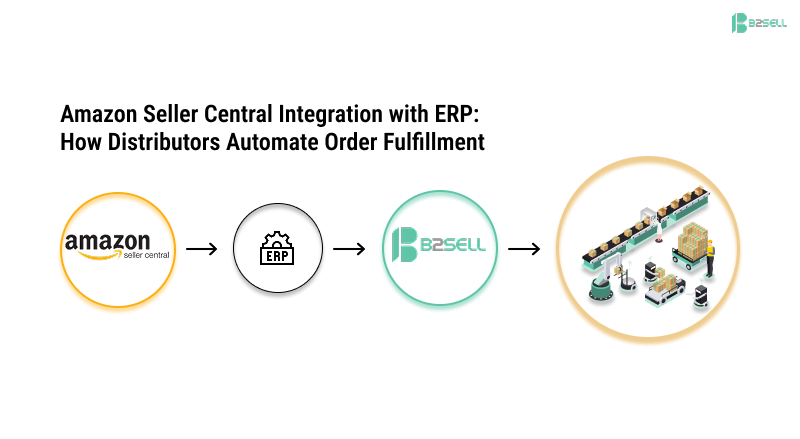
Amazon Seller Central integration with your ERP fixes this. It connects the two systems so orders, inventory, pricing, and shipments move automatically. No copy-paste. No spreadsheets. No oversold SKUs.
This guide explains how the integration works, what it costs in time and money to skip it, and how distributors set it up the right way the first time. By the end, you will know exactly what to ask for when you scope a project.
Quick start: B2Sell connects Amazon Seller Central directly to Epicor P21, SAP Business One, NetSuite, Prophet 21, Eclipse, and more.
What Is Amazon Seller Central Integration?
Amazon Seller Central integration is a middleware connection that automatically syncs product listings, inventory, orders, and shipping data between your Amazon Seller Central account and your back-office ERP system.
In plain words: it is the bridge that lets your ERP and Amazon talk to each other in real time.
The integration uses Amazon's SP-API (Selling Partner API) on one side and your ERP's API or database on the other. Middleware sits in the middle and handles the translation, retries, and error handling.
Three things flow through that bridge:
- Orders flow in — Every Amazon order lands in your ERP within minutes, fully formatted with customer, SKU, quantity, and shipping info.
- Inventory flows out — Every stock change in your ERP updates Amazon, so you never sell what you don't have.
- Shipments flow back — Tracking numbers from your ERP post to Amazon, which keeps your seller metrics healthy.
Without this bridge, every one of those moves is a manual job. With it, your team focuses on growth, not data entry.
Why Distributors Need Amazon Seller Central ERP Integration in 2026
Distributors face a different problem than DTC brands. You have thousands of SKUs. You have customer-specific pricing. You have multiple warehouses. You may run both FBA and FBM. Manual processes break fast at that scale.
Here is what changes the moment you connect the two systems:
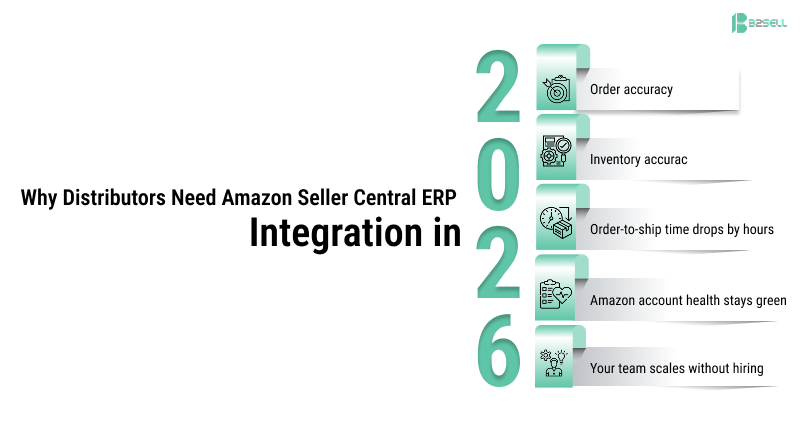
- Order accuracy goes from ~95% to 99.9%+ — Rekeying causes typos in quantities, addresses, and SKUs. APIs do not make typos.
- Inventory accuracy stays above 99% — Real-time sync prevents the lag that causes oversells.
- Order-to-ship time drops by hours — Orders that used to wait for the next batch upload ship same-day.
- Amazon account health stays green — Late shipments and cancellations are the fastest way to lose the Buy Box. Automation prevents both.
- Your team scales without hiring — Doubling Amazon volume should not mean doubling your ops team.
For distributors running Epicor P21, SAP Business One, NetSuite, or Eclipse, the math is simple. One ops person rekeying 100 orders a day costs roughly $40K–$60K a year fully loaded. A proper integration pays for itself in months.
How Amazon Seller Central Integration Works: The 6-Step Data Flow
Most distributors think of an integration as a single button. It is actually six coordinated flows running in parallel. Understanding each one helps you scope a project correctly and ask better questions on a demo.

Step 1: Product Listings Sync Your ERP holds the master product catalog. The integration pushes product data (title, description, images, attributes, ASIN, SKU) to Amazon. When you update a product in your ERP, Amazon updates too.
Step 2: Inventory Sync Stock changes in your ERP — from a new shipment, a sale on another channel, or a warehouse transfer — get pushed to Amazon in near real time. Distributors with multiple warehouses get consolidated stock visibility across every location.
Step 3: Pricing Sync Price updates flow from ERP to Amazon. Some distributors automate Buy Box repricing here, others keep manual control. Both work.
Step 4: Order Import New Amazon orders import into your ERP as sales orders. The integration handles customer creation, SKU matching, tax fields, and shipping method mapping.
Step 5: Fulfillment Sync When your warehouse ships an order, the tracking number and carrier flow back to Amazon. This is the step that protects your seller metrics.
Step 6: Settlement & Reconciliation Amazon's settlement reports (fees, refunds, payouts) import into your ERP so your accounting team has clean financial data without manual reconciliation.
When all six flows are working, your ops team stops touching Amazon orders entirely. They only step in for exceptions.
FBA vs FBM vs SFP: What the Integration Handles Differently
Distributors often run more than one Amazon fulfillment model. Your integration needs to handle each correctly. Here is the short version.
- FBA (Fulfilled by Amazon) — You ship inventory to Amazon. Amazon stores, picks, packs, and ships. Your ERP needs to know FBA stock vs. your own warehouse stock, separately.
- FBM (Fulfilled by Merchant) — You fulfill the order from your warehouse. Your ERP owns the full pick-pack-ship workflow.
- SFP (Seller Fulfilled Prime) — You fulfill, but Amazon expects Prime-grade speed. Your ERP must trigger same-day or next-day shipping rules.
A good integration treats these as separate logical streams. Stock levels for FBA and FBM never mix. Order routing rules know which warehouse owns which order. This is where cheap integrations fail and distributors find out only after they have oversold.
Comparative Table: Manual vs Generic Connector vs B2Sell ERP Integration
This is the question every distributor eventually asks: do I really need a purpose-built integration, or will a Zapier-style connector do the job?
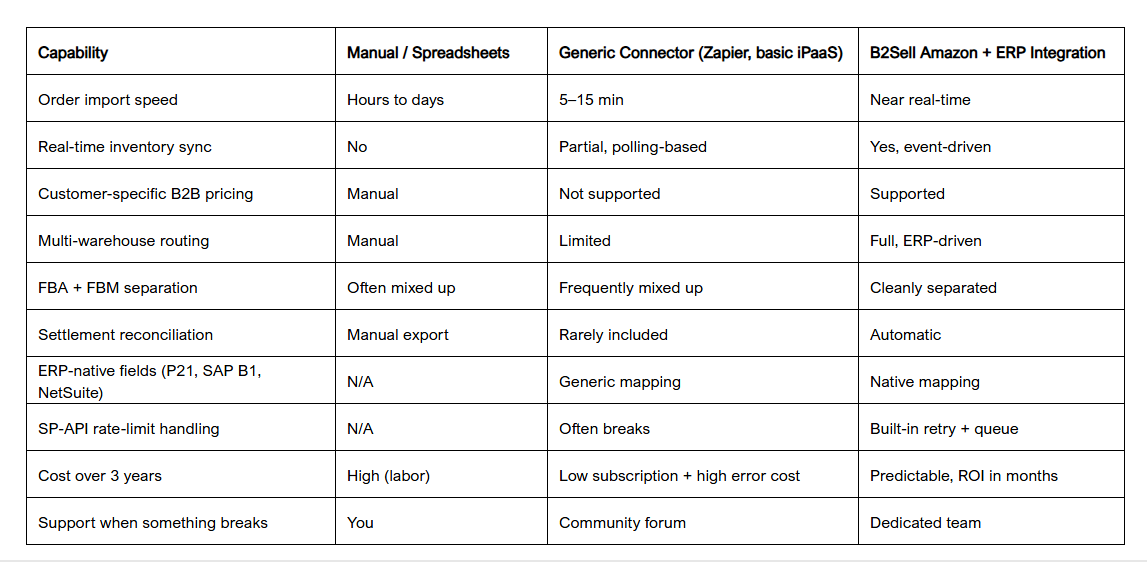
The pattern is consistent: generic connectors get you 60% of the way and leave the other 40% — the part that actually matters for distributors — to manual work.
Ready to see what a purpose-built integration looks like for your ERP? Book a 20-minute walkthrough →
The Hidden Cost of Skipping Amazon ERP Integration
Most distributors underestimate the cost of running Amazon manually because the cost is spread across many small leaks.
Here is where the money actually goes:
- Labor: One full-time data-entry role per ~$2M of Amazon revenue is common. That is $50K+ in fully loaded cost.
- Oversells: Each oversold order costs the refund, the shipping, the seller-metric hit, and often the customer.
- Late shipments: Account-health dings cost Buy Box share. Buy Box share is revenue.
- Reconciliation time: Finance teams burn 5–10 hours a week matching Amazon settlements to ERP entries.
- Lost catalog freshness: Products that change in your ERP but not on Amazon erode listing quality and ranking.
- Limited scaling: You cannot launch a second marketplace or a second region while still manually handling the first.
Distributors who calculate this honestly usually find the manual approach costs 3–5x what a proper ERP integration costs to build and run.
What to Look For in an Amazon Seller Central Integration Partner
Not every integration vendor is built for B2B distribution. Many were designed for DTC brands and break when you add customer-specific pricing, multi-warehouse logic, or 100,000-SKU catalogs.
When you evaluate a partner, check these eight things:
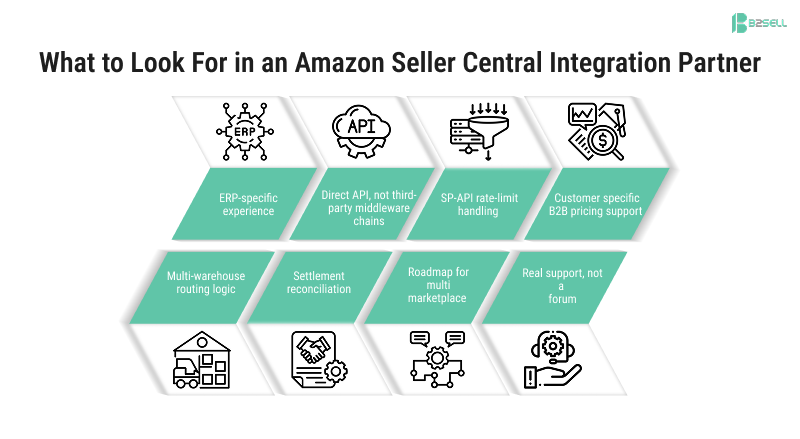
- ERP-specific experience — Do they have customers running your exact ERP (P21, SAP B1, NetSuite, Eclipse, Prophet 21, Acumatica, Dynamics 365)?
- Direct API, not third-party middleware chains — Every extra hop is a failure point.
- SP-API rate-limit handling — Amazon throttles. Your integration needs queues and retries.
- Customer-specific B2B pricing support — Critical if you sell B2B and B2C from the same catalog.
- Multi-warehouse routing logic — Orders must route to the right facility automatically.
- Settlement reconciliation — Otherwise finance still does it by hand.
- Roadmap for multi-marketplace — Walmart, eBay, and others should plug in the same way.
- Real support, not a forum — When SP-API changes (and it will), you need a human.
B2Sell's integrations directory is built around exactly these criteria for distributors and manufacturers.
How Long Does an Amazon Seller Central ERP Integration Take?
For most distributors, a properly scoped project runs 4–8 weeks end to end. That breaks down as:
- Week 1–2: Discovery, SKU mapping, field mapping, sandbox setup
- Week 3–4: Build of the six flows (listings, inventory, pricing, orders, fulfillment, settlement)
- Week 5–6: UAT with real orders in a staging environment
- Week 7–8: Go-live and monitored stabilization
The biggest driver of timeline is data quality. Distributors with clean SKU master data go live in four weeks. Distributors with messy catalogs and overlapping SKUs across channels need closer to eight.
This is one place where AI-assisted development has changed the equation in 2025–2026. Mapping, testing, and edge-case handling that used to need senior developer time can now happen in days, not weeks, when the integration partner uses modern tooling. Ask your vendor how they use AI in their build process — the gap between vendors who do and vendors who don't is now measured in months of timeline.
Real-World Example: A Distributor's Path from Manual to Automated
Consider a typical mid-market distributor running Epicor Prophet 21 with $15M in Amazon FBM revenue.
Before integration:
- Two ops staff spending ~60% of their day on Amazon order entry
- ~2% oversell rate due to inventory lag
- 4-hour average order-to-pick time
- Finance burning 6 hours a week on settlement reconciliation
- Account health hovering near "at risk" during peak season
After B2Sell Amazon + P21 integration goes live:
- Ops staff redeployed to customer service and growth tasks
- Oversell rate drops below 0.2%
- Order-to-pick time drops to under 30 minutes
- Settlement reconciliation runs automatically each morning
- Account health stable at "Good" through Q4 peak
The integration paid for itself in just over four months. The bigger win was that the distributor then launched Walmart and a second Amazon region using the same architecture — something that would have been impossible while still entering orders by hand.
Common Mistakes Distributors Make (and How to Avoid Them)
Even with a solid partner, projects go sideways for predictable reasons. The good news is they are all avoidable.
- Treating it as an IT project, not an operations project — Ops owns the workflow. IT owns the plumbing. Both need to be in the room.
- Skipping SKU cleanup — Garbage in, garbage out. Clean the catalog before you connect it.
- Mapping every field by default — Map what you need now. Add fields as you grow.
- Ignoring exceptions — 95% of orders fly through. The 5% that don't will eat your team if you have no exception workflow.
- No monitoring — When SP-API changes, you want to know in 10 minutes, not 10 days.
- Trying to do it without ERP-side expertise — The integration is half Amazon, half your ERP. Both halves matter equally.
The distributors who get this right treat the integration as a continuous operations capability, not a one-time IT delivery.
How B2Sell's Amazon Seller Central Integration Works
B2Sell connects Amazon Seller Central directly to your ERP — including SAP Business One, Epicor P21, NetSuite, Eclipse, Prophet 21, Odoo, Acumatica, and Microsoft Dynamics 365 — without any third-party middleware in the middle.
What that means in practice:
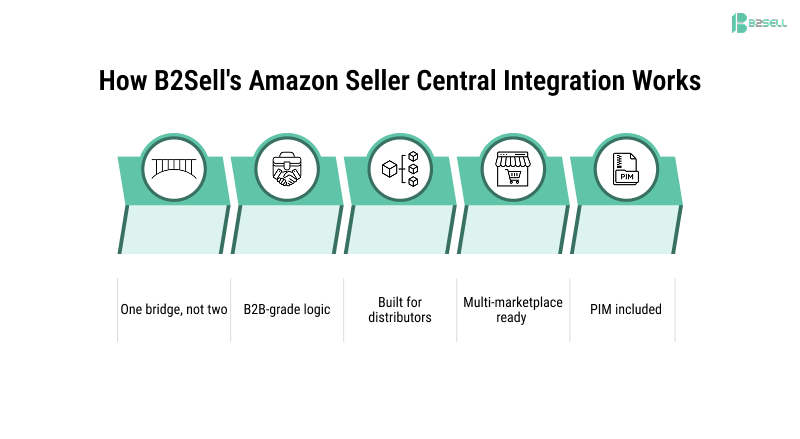
- One bridge, not two — Your data does not pass through a generic iPaaS before reaching your ERP.
- B2B-grade logic — Customer-specific pricing, multi-warehouse routing, and unit-of-measure conversion are first-class features, not workarounds.
- Built for distributors — Every flow has been tested at distributor scale, not DTC scale.
- Multi-marketplace ready — Once Amazon is connected, Walmart, eBay, and Facebook Marketplace use the same backbone.
- PIM included — B2Sell eCentral PIM keeps your catalog clean across every channel, so Amazon always shows your best product data.
If you are running any of these ERPs and selling on Amazon, the integration is already battle-tested for your stack. You are not paying to be someone's first customer.
Automate Your Amazon Seller Central Integration with B2Sell
Manual Amazon order processing is the single biggest hidden cost for most B2B distributors selling online. Every day you postpone a real Amazon Seller Central integration with your ERP is a day your team rekeys orders, your inventory drifts, and your account health takes small hits that add up by Q4.
The fix is not complicated. The right partner connects Amazon Seller Central to your ERP in 4–8 weeks, eliminates the manual work, and gives you back the headcount to actually grow the channel.
B2Sell builds these integrations for distributors and manufacturers every day — across SAP Business One, Epicor P21, NetSuite, Eclipse, Prophet 21, and more.
Next step: Get a free demo tailored to your ERP and your Amazon volume →
Frequently Asked Questions
What is Amazon Seller Central integration with ERP?
Amazon Seller Central integration with ERP is a middleware connection that automatically syncs orders, inventory, pricing, and shipments between Amazon and your ERP system. It removes manual data entry and keeps both systems accurate in near real time.
How long does Amazon Seller Central ERP integration take to implement?
For most distributors, implementation takes 4–8 weeks. Discovery and mapping take 1–2 weeks, the build takes 2–3 weeks, and UAT plus go-live take another 2–3 weeks. Clean SKU data shortens the timeline.
What is the difference between FBA and FBM integration?
FBA (Fulfilled by Amazon) integration syncs Amazon-side fulfillment data — Amazon stores and ships your inventory. FBM (Fulfilled by Merchant) integration syncs orders to your own warehouse so your ERP handles pick, pack, and ship. A good integration handles both as separate logical flows.
Can Amazon Seller Central integrate with any ERP?
Yes. Through Amazon's SP-API, Seller Central can connect to any ERP that supports modern APIs or database access. B2Sell supports Epicor P21, SAP Business One, NetSuite, Eclipse, Prophet 21, Acumatica, Odoo, Microsoft Dynamics 365, and more.
Does B2Sell handle Amazon SP-API rate limits?
Yes. B2Sell's integration includes built-in retry logic, queueing, and intelligent throttling so SP-API limits never cause failed syncs or missed orders.
Will the integration support customer-specific B2B pricing?
Yes. B2Sell was built for B2B distribution, so customer-specific pricing, contract pricing, and tiered pricing are first-class features — not workarounds.
How does Amazon Seller Central integration improve order fulfillment?
It automates order import, inventory updates, pick-pack-ship triggers, and shipment confirmation. Orders that took hours of manual handling fulfill in minutes, oversells drop near zero, and account health stays in good standing.
What does Amazon Seller Central integration cost?
Costs vary by ERP, volume, and complexity. Most distributors recoup the investment within 4–8 months through labor savings, reduced oversells, and better Buy Box share. Contact B2Sell for a quote tailored to your stack.
Can I add Walmart or eBay later using the same integration?
Yes. Once Amazon Seller Central is connected through B2Sell, adding Walmart, eBay, Facebook Marketplace, or Instagram Shopping uses the same backbone — most additional marketplaces deploy in 2–3 weeks.
What happens if Amazon changes the SP-API?
B2Sell monitors SP-API changes and updates the integration as part of ongoing support. Distributors do not have to maintain the integration themselves.
.png)
.png)
.png)


.png)