


Introduction
Your customers don't want to call. They want to log in, check their order status, view invoices, and reorder at 2 AM without waiting for your inside sales team to open.
For distributors running Epicor Prophet 21, a B2B customer portal isn't a luxury—it's a survival requirement. As buyer expectations shift toward self-service experiences modeled after consumer ecommerce, distributors without a portal lose deals to competitors who have one.
This guide covers everything you need to know about Prophet 21 customer portals: what they do, why they matter, how they integrate with your ERP, and what to look for when choosing a solution.
What Is a Prophet 21 Customer Portal?
A Prophet 21 customer portal is a secure, web-based interface where your B2B customers can:
1 . View account information — balances, credit limits, payment terms
2. Check order status — real-time tracking from P21
3. Access invoice history — download PDFs, view payment records
4. Place new orders — with customer-specific pricing from P21
5. Reorder from history — one-click repurchase of past orders
6. Manage multiple ship-to locations — for customers with multiple sites
7. Request quotes — that sync directly to P21
The portal pulls data directly from Prophet 21, ensuring customers see accurate pricing, inventory availability, and order history without your team manually updating anything.
Why Distributors Need a Customer Portal in 2026

1. Reduce Inbound Call Volume
Every "where's my order?" phone call costs you time and money. A self-service portal lets customers answer their own questions—order status, invoice lookup, tracking information—without tying up your CSR team.
Distributors typically see 30–50% reduction in routine inquiry calls after implementing a customer portal.
2. Enable 24/7 Ordering
Your customers work across time zones, shifts, and schedules. A portal lets them place orders at midnight on Saturday without waiting for Monday morning.
Self-service ordering means more orders captured from customers who would otherwise delay or go elsewhere.
3. Improve Order Accuracy
Phone orders and emailed POs create data entry errors. A portal with direct P21 integration eliminates manual keying—customers select products, the portal validates pricing and availability against P21, and orders flow straight into the ERP.
Fewer errors = fewer returns, credits, and frustrated customers.
4. Customer Expectations Have Changed
Your customers shop on Amazon. They use apps for everything. They expect the same self-service experience from their industrial suppliers.
A clunky portal—or no portal at all—signals that your business operates in the past.
5. Competitive Differentiation
Many distributors still run on phone/email/fax ordering. A modern customer portal becomes a selling point: "Work with us and you get 24/7 account access, order tracking, and invoice downloads."
Core Features of Epicor P21 Customer Portal

Real-Time ERP Integration
The portal must sync with Prophet 21 in real time—not batch updates, not overnight imports. When a customer logs in, they should see:
Current account balance (from P21)
Live inventory levels (by warehouse)
Customer-specific pricing (contract pricing, tier discounts)
Open orders and backorder status
Anything less creates confusion and support tickets.
Customer-Specific Pricing
B2B pricing is complex. Your customers have negotiated rates, volume discounts, and contract pricing that differs by customer. The portal must display their prices, not list prices.
This requires deep P21 integration that respects your existing pricing rules—customer price classes, contract pricing, quantity breaks.
Multi-Warehouse Inventory Visibility
If you operate multiple warehouses, customers need to see availability by location. This helps them choose the right ship-from warehouse or understand when items will arrive from another location.
Advanced portals show available-to-promise quantities that account for allocated inventory and incoming purchase orders.
Invoice and Payment History
Customers should access at least two years of order and payment history directly from P21. Features to look for:
Downloadable PDF invoices
Payment status (paid, open, overdue)
Ability to filter by date range or PO number
Credit memo visibility
This reduces "can you send me a copy of invoice #12345?" calls to zero.
Quick Order / Reorder Functions
B2B customers often buy the same items repeatedly. A good portal makes this effortless:
1. Quick order entry — type item number and quantity, skip browsing
2. Bulk upload — paste or upload a spreadsheet of items
3. Saved carts / order templates — for recurring orders
4. Order history reorder — one click to repurchase a past order
These features increase order velocity and customer satisfaction.
Mobile-Responsive Design
Field technicians, site managers, and purchasing agents don't always sit at desks. The portal must work on phones and tablets—not just "render" but be genuinely usable for quick orders and lookups.
Integration Architecture: How It Works
A Prophet 21 customer portal connects to your ERP through APIs. Here's the typical architecture:
Customer Browser → Portal Application → P21 API/Web Services → Prophet 21 Database
Key Integration Points:
1. Customer Authentication — Portal verifies login against P21 customer records
2. Pricing Calls — Portal requests customer-specific pricing from P21 in real time
3. Inventory Queries — Portal checks P21 inventory by warehouse
4. Order Submission — Portal creates orders directly in P21
5. Invoice/History Retrieval — Portal pulls historical data from P21
What to Ask Vendors:
1. Is integration real-time or batch?
2. How does the portal handle P21 downtime?
3. Does it support P21 customizations and custom fields?
4. What P21 versions are supported?
Options for Prophet 21 Customer Portals
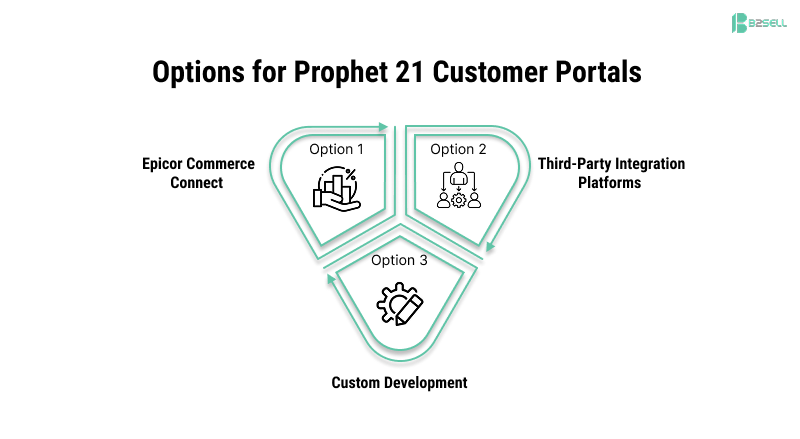
Option 1: Epicor Commerce Connect
Epicor's native ecommerce module includes customer portal functionality. It offers tight integration and comes from the same vendor as P21.
Pros: Native integration, supported by Epicor, single vendor relationship
Cons: Less flexibility in design/UX, may require additional modules, can be costly
Option 2: Third-Party Integration Platforms
Solutions like B2Sell, Silk Commerce, and others specialize in P21 ecommerce and portal solutions. These typically offer:
* More design flexibility
* Specialized distribution features
* Turnkey implementation packages
* Lower total cost for many distributors
Pros: Specialized expertise in distribution, flexible design, often faster implementation
Cons: Requires evaluating vendor stability and integration depth
Option 3: Custom Development
Building a custom portal on top of P21 APIs. Only viable for large distributors with internal development teams.
Pros: Complete control over features and design
Cons: High cost, ongoing maintenance burden, requires P21 API expertise
Implementation Considerations
Data Readiness
Before launching a portal, audit your P21 data:
Are product descriptions customer-friendly or internal shorthand?
Are images available for products?
Is customer-specific pricing accurately maintained?
Are ship-to addresses current?
A portal exposes your data to customers. Clean data = professional appearance.
User Adoption Strategy
Building the portal is half the work. Getting customers to use it requires:
Onboarding communications — announce the portal, explain benefits
Login credentials — easy registration or distribution process
Training resources — quick-start guides, video walkthroughs
Incentives — some distributors offer small discounts for portal orders
Plan for a 3–6 month adoption curve where you actively migrate customers from phone/email ordering.
Internal Process Changes
A portal changes your workflow:
Who monitors portal orders vs. phone orders?
How do you handle portal support questions?
Who manages customer registration and access?
How do CSRs adapt to fewer routine calls?
Map these process changes before go-live.
Measuring Portal Success
Track these metrics to prove ROI:

Common Mistakes to Avoid
1. Launching Without Training
If customers don't know the portal exists or how to use it, adoption stalls. Plan communication campaigns before launch.
2. Poor Mobile Experience
Testing only on desktop screens. Your customers will use phones. Test thoroughly on mobile.
3. Ignoring the Browsing Experience
Some portals assume customers know exactly what they need. But customers browse, compare, and discover. Include good search, filtering, and product recommendations.
4. Batch Integration Instead of Real-Time
Stale pricing or inventory data creates customer frustration and support tickets. Insist on real-time P21 integration.
5. No Clear Ownership
Who owns the portal internally? Without a dedicated owner, portals stagnate—content goes stale, issues go unresolved, adoption plateaus.
FAQ: Prophet 21 Customer Portals
How long does implementation take?
Typical implementations take 8–16 weeks depending on customization requirements and data readiness. Turnkey solutions on the faster end, custom development on the slower end.
What does a P21 customer portal cost?
Ranges from $15,000–$100,000+ depending on scope. Turnkey SaaS solutions start around $1,000–2,500/month. Custom development significantly more.
Can we use the portal for B2C customers?
Yes, but B2B and B2C have different requirements (pricing, checkout, account structures). Ensure the solution supports both if you sell direct-to-consumer.
Does the portal work with our P21 customizations?
Depends on the vendor and customizations. Most integration platforms handle standard P21 configurations. Custom fields and workflows may require additional development.
Can customers see backorders and expected dates?
Good portals pull this data from P21. Verify the solution accesses P21's backorder and ATP (available-to-promise) information.
Next Steps
If you're evaluating Prophet 21 customer portal options:
Audit your current state — How do customers order today? What questions clog your support lines?
Document requirements — List must-have features vs. nice-to-haves
Evaluate vendors — Request demos from 2–3 providers
Check references — Talk to other P21 distributors using each solution
Plan adoption — Don't launch without a customer communication strategy
Ready to see what a modern P21 customer portal looks like?
B2Sell has helped distributors transform their customer experience with portals built specifically for Epicor Prophet 21. Real-time integration, customer-specific pricing, and turnkey implementation.
Related reading:
How P21 Ecommerce Improves Customer Self-Service for Distributors
.png)
.png)
.png)


.png)