


In today’s B2B world, distributors manage thousands of SKUs, multiple warehouses, changing prices, and many sales channels. Keeping product data accurate across systems is not easy. This is where pim erp integration becomes critical.
PIM ERP integration connects your Product Information Management (PIM) system with your Enterprise Resource Planning (ERP) system. It ensures product data flows smoothly between both systems. The result is clean data, fewer errors, and faster operations.
This guide explains everything distributors need to know about ERP PIM integration, how it works, benefits, challenges, and best practices. It also shows how B2Sell supports distributors with powerful ERP and PIM integration solutions.
What is PIM ERP Integration?
PIM ERP integration is the process of connecting a PIM system with an ERP system to synchronize product information automatically.
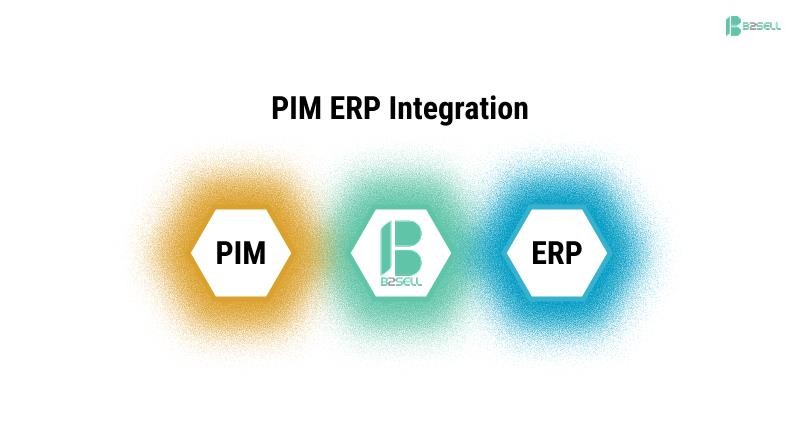
ERP manages operational data.
- PIM manages enriched product data for sales and marketing.
- Integration ensures both systems share accurate information.
Simple Definition
ERP stores the core product data. PIM enhances it. Integration keeps them in sync.
Understanding ERP Systems
An ERP system is the backbone of a distribution business. It manages:
- Inventory levels
- Pricing rules
- Supplier data
- Order processing
- Financial records
- Customer accounts
Common ERP systems used by distributors include:
- Epicor Prophet 21
- SAP Business One
- NetSuite
- Microsoft Dynamics
ERPs are strong in operations. But they are not built for rich product content.
What is a PIM System?
A PIM system centralizes and enriches product information.
It manages:
- Product descriptions
- Technical specifications
- Attributes and variants
- Images and videos
- Marketing content
- SEO data
- Channel-specific formatting
PIM ensures product data is clean, complete, and consistent across channels.
If your ERP is your operational engine, your PIM is your product content engine.
For distributors exploring structured product data management, solutions like B2Sell PIM provide centralized product control with ERP connectivity.
Why Distributors Need PIM ERP Integration
Distributors handle large product catalogs. Many products come from different manufacturers. Data is often incomplete or inconsistent.
Without erp pim integration, common problems include:
- Manual data entry
- Duplicate records
- Inconsistent product descriptions
- Incorrect pricing on ecommerce sites
- Delayed product launches
- Channel errors
Real-World Scenario
A distributor updates pricing in the ERP.
If there is no integration:
- The ecommerce team manually updates the website.
- The sales team updates printed catalogs.
- Marketplaces must be updated separately.
This leads to delays and mistakes.
With pim erp integration:
- Price updates sync automatically.
- All channels reflect the change instantly.
- Errors reduce significantly.
How PIM ERP Integration Works
PIM ERP integration follows a structured data flow process.
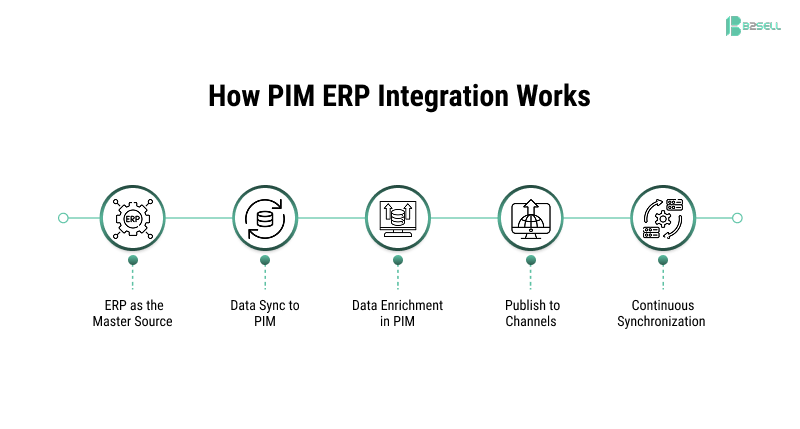
Step 1: ERP as the Master Source
ERP provides:
- SKU numbers
- Base product names
- Cost and pricing
- Inventory availability
- Supplier information
Step 2: Data Sync to PIM
Product data moves from ERP to PIM through:
- API connections
- Scheduled data sync
- Real-time integration
Step 3: Data Enrichment in PIM
Inside PIM:
- Add marketing descriptions
- Standardize attributes
- Attach images
- Create category structures
- Define channel-specific formats
Step 4: Publish to Channels
PIM distributes enriched data to:
- Ecommerce platforms
- Marketplaces
- Sales portals
- Mobile apps
- Print catalogs
Step 5: Continuous Synchronization
Updates in ERP automatically flow to PIM.
Changes in PIM content reflect across sales channels.
What Data Should Be Synced Between ERP and PIM?
A strong pim erp integration includes the following data flows:
.png)
From ERP to PIM
- SKU and product ID
- Pricing (base and tier)
- Inventory levels
- Cost data
- Supplier info
- Units of measure
From PIM to Other Systems
- Enriched descriptions
- Marketing content
- Technical attributes
- Images and documents
- Category mapping
Optional Two-Way Sync
Some setups allow:
- Attribute updates flowing back to ERP
- Status updates syncing automatically
Each distributor’s needs may vary.
Benefits of PIM ERP Integration for Distributors
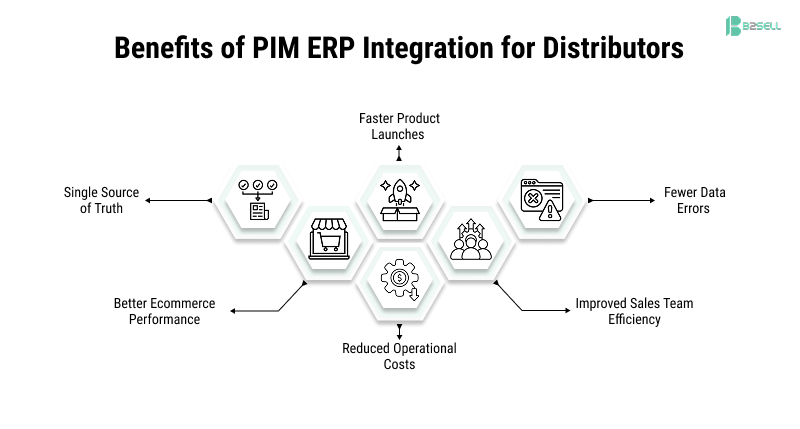
1. Single Source of Truth
ERP holds operational data.
PIM holds enriched content.
Integration ensures consistency across systems.
2. Faster Product Launches
New products can be:
- Imported from ERP
- Enriched in PIM
- Published quickly
Time-to-market improves.
3. Fewer Data Errors
Manual updates are reduced.
Automated syncing prevents inconsistencies.
4. Better Ecommerce Performance
Accurate product information improves:
- Search visibility
- Conversion rates
- Customer trust
5. Reduced Operational Costs
Less manual work means:
- Lower labor cost
- Fewer support tickets
- Fewer pricing disputes
6. Improved Sales Team Efficiency
Sales reps access consistent product data across systems.
Common Challenges in PIM ERP Integration
Even though integration is powerful, distributors must prepare carefully.
Data Mapping Issues
- ERP fields may not match PIM fields
- Units of measure may differ
- Attribute naming may be inconsistent
Complex Product Structures
Some distributors manage:
- Bundled products
- Kits
- Configurable items
These require proper mapping.
Custom Pricing Rules
ERP often manages:
- Tier pricing
- Contract pricing
- Region-based pricing
Integration must respect these rules.
Change Management
Teams must:
- Adapt to new workflows
- Follow new data governance rules
- Avoid bypassing the system
Good planning reduces these risks.
Best PIM Integrations for ERP Platforms
When choosing the best pim integrations for erp platforms, distributors should consider:
- Native ERP connectors
- API-based flexibility
- Real-time sync capabilities
- Scalability
- Multi-channel publishing support
B2Sell offers structured pim software integrations with erp systems built specifically for B2B distributors. The integration is designed to align operational ERP data with enriched product data.
PIM Software Integrations with ERP Systems: What to Look For
When evaluating pim software integrations with erp systems, focus on:
1. Data Mapping Capabilities
Ensure:
- Custom fields can sync
- Attribute mapping is flexible
- SKU structures align
2. Automation Features
Look for:
- Scheduled sync
- Real-time updates
- Error alerts
3. Security and Access Control
Protect sensitive data such as:
- Pricing
- Cost information
- Customer data
4. Scalability
Your integration must handle:
- Growing product catalogs
- Multi-warehouse data
- International expansion
PIM ERP Integration Best Practices
Following pim erp integration best practices ensures long-term success.
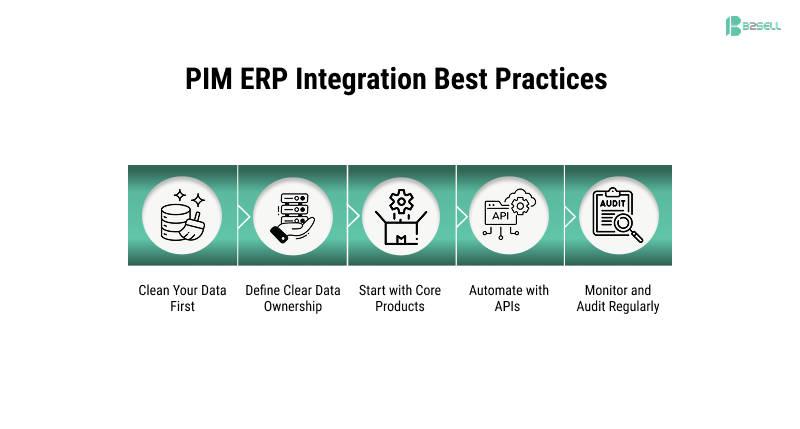
1. Clean Your Data First
Before integration:
- Remove duplicates
- Standardize naming
- Fix missing fields
- Review product categories
Clean data improves results.
2. Define Clear Data Ownership
Decide:
- ERP owns pricing and inventory
- PIM owns descriptions and attributes
Clear ownership avoids confusion.
3. Start with Core Products
Begin with:
- High-volume SKUs
- Key categories
- Important customers
Then expand gradually.
4. Automate with APIs
Choose real-time API integration for:
- Inventory updates
- Price changes
- Product availability
This prevents order errors.
5. Monitor and Audit Regularly
Track:
- Sync failures
- Data mismatches
- Update frequency
Continuous monitoring ensures accuracy.
Architecture Overview of ERP PIM Integration
A typical architecture includes:
ERP → Integration Layer → PIM → Sales Channels
Integration Layer
This can be:
- Middleware
- API gateway
- Native connector
The integration layer ensures structured data flow.
Use Cases for Distributors
Multi-Channel Distribution
Distributors selling through:
- Ecommerce
- Field sales
- Dealers
- Marketplaces
Need consistent product information.
Managing Large Catalogs
Thousands of SKUs require centralized control.
Manufacturer Data Syndication
Suppliers provide raw data.
PIM standardizes it before publishing.
Why ERP Alone Is Not Enough
ERP systems are built for:
- Transactions
- Accounting
- Inventory
They are not built for:
- SEO content
- Rich media management
- Channel formatting
- Marketing descriptions
PIM fills this gap.
How B2Sell Supports Distributors with PIM ERP Integration
B2Sell provides a structured approach to pim erp integration built for B2B distributors.
Key capabilities include:

- Seamless ERP connectivity
- Automated data synchronization
- Attribute mapping
- Multi-channel publishing
- Role-based access control
- Scalable architecture
The platform supports integration with leading ERP systems and ensures product data flows efficiently between systems.
Distributors using B2Sell benefit from:
Centralized Product Management
B2Sell PIM:
- Collects product data
- Enriches content
- Maintains version control
- Manages multi-channel publishing
Explore here: PIM Software
ERP Connectivity
B2Sell ERP Integration supports:
- Secure data transfer
- Real-time synchronization
- Custom mapping
- Validation logic
More details: B2Sell's PIM ERP Integration
Designed for Distributors
B2Sell understands distributor needs:
- Complex pricing
- Tiered customer pricing
- Large catalogs
- Vendor-based data
Solutions are built specifically for B2B workflows.
Scalable Integration Framework
B2Sell integration supports:
- Multiple ERP systems
- Ecommerce platforms
- CRM tools
- Mobile apps
This creates a unified ecosystem.
Step-by-Step Implementation Plan
Phase 1: Assessment
- Review ERP data structure
- Identify integration goals
- Define success metrics
Phase 2: Data Preparation
- Clean product records
- Standardize attributes
- Remove duplicate SKUs
Phase 3: Integration Setup
- Configure API connections
- Map ERP fields to PIM
- Define sync frequency
Phase 4: Testing
- Validate product data flow
- Test pricing updates
- Check inventory synchronization
Phase 5: Go Live
- Launch integration
- Monitor performance
- Train internal teams
Long-Term Value of PIM ERP Integration
Over time, pim erp integration delivers:
- Data accuracy
- Operational efficiency
- Improved customer trust
- Stronger digital growth
- Scalable product expansion
For B2B distributors, product data is a strategic asset. When ERP and PIM systems work together, operations become smoother and sales channels become more reliable.
Frequently Asked Questions
Is PIM ERP integration only for large distributors?
No. Even mid-sized distributors benefit from automation.
Does integration require replacing ERP?
No. Integration connects systems. It does not replace ERP.
How long does implementation take?
Timeline depends on:
- Data complexity
- ERP structure
- Custom requirements
Planning reduces delays.
Is real-time integration necessary?
Not always. But it is recommended for:
- Inventory accuracy
- High transaction volumes
Final Thoughts: Building a Strong Foundation with PIM ERP Integration
For distributors, pim erp integration is not just a technical project. It is a strategic move.
It connects operations with product experience.
It aligns ERP accuracy with marketing clarity.
It creates one source of truth across systems.
By following proven pim erp integration best practices, choosing the best pim integrations for erp platforms, and using reliable pim software integrations with erp systems like B2Sell, distributors can simplify product management and support ecommerce growth.
If your organization is struggling with scattered product data, manual uploads, or inconsistent ecommerce listings, it may be time to invest in a structured erp pim integration strategy.
The right integration will reduce errors, improve efficiency, and create a scalable product data ecosystem for long-term success.
.png)
.png)
.png)


.png)