


If your business runs on SAP Business One, your ecommerce success depends on one thing above all else: integration.
A storefront is only as good as the data behind it. If inventory is outdated, contract pricing is wrong, customer records do not sync, or orders have to be re-entered manually, your ecommerce channel becomes a bottleneck instead of a growth engine.
That is the reality for many distributors and manufacturers in 2026. Buyers expect accurate pricing, live inventory, fast order confirmation, and self-service account access. They do not want to call your sales team just to confirm what the website should already know.
This is why SAP B1 ecommerce integration has become a strategic priority. It connects SAP Business One to your ecommerce platform so product data, pricing, inventory, customers, orders, shipping updates, and invoices move automatically between systems.
For distributors and manufacturers, the goal is simple: make SAP Business One the single source of truth and let your ecommerce channel reflect it in real time.
SAP Business One ecommerce solution
What Is SAP B1 Ecommerce Integration?

SAP B1 ecommerce integration is the technical link between SAP Business One ERP and an online sales channel such as a B2B portal, B2C store, marketplace, or punchout catalog. It keeps products, pricing, inventory, customers, and orders synchronized automatically.
In 2026, the four main methods are the Service Layer (REST API), the DI API, the SAP B1 Integration Framework (B1if), and third-party iPaaS connectors.
The purpose of integration is to eliminate manual work and data mismatch. Instead of updating systems separately, your ERP manages the operational data and your online store displays it accurately.
A well-designed SAP Business One ecommerce integration typically manages:
- Products and catalog data
- Customer-specific pricing and discounts
- Inventory availability by warehouse
- Sales orders and order status
- Shipment updates and tracking
- Invoices, payments, and credit memos
- Business partner data and account details
This is the foundation of SAP B1 ERP ecommerce success. Without it, even the best-designed storefront will create confusion inside your operations team and frustration for your customers.
Why SAP Business One Ecommerce Integration Matters Now
The pressure on ERP-connected ecommerce has changed dramatically.
Buyers expect real-time accuracy
B2B customers now expect the same convenience they get from consumer ecommerce. They want live pricing, quick reordering, account visibility, and self-service access to order history.
Multiple channels have made manual processes impossible
Most businesses are no longer selling through one website. They are juggling a website, marketplaces, EDI partners, sales reps, and customer portals. Manual updates do not scale across that environment.
Integration failures now affect revenue directly
When product data is stale or inventory is wrong, customers abandon carts, sales reps lose confidence, and operations teams waste hours fixing preventable errors.
SAP Business One is built to support connected operations
SAP Business One works best when it is linked to surrounding systems. That is why modern SAP B1 integration 2026 strategies increasingly center on APIs, middleware, and native ecommerce platforms.
In short, ecommerce is no longer separate from ERP. For SAP Business One users, the two must work as one system.
The 4 Ways to Integrate SAP B1 With Ecommerce in 2026
The four ways to integrate SAP B1 with ecommerce in 2026 are:

- SAP B1 Service Layer — REST and OData API for cloud and web apps
- DI API — COM-based SDK for deep server-side logic
- SAP B1 Integration Framework (B1if) — SAP's built-in middleware
- Third-party iPaaS — APPSeCONNECT, Celigo, Boomi, MuleSoft
1) SAP B1 Service Layer
The Service Layer is a modern RESTful API framework designed for SAP Business One. It uses JSON over HTTP and is ideal for cloud-based and web-based applications.
It is the preferred option for modern integrations because it is easier to work with than older SAP methods and aligns well with ecommerce platforms that already use APIs.
Best for: cloud applications, modern storefronts, and web-first integrations.
2) DI API
The DI API is SAP Business One’s older SDK-style integration option. It is powerful and gives developers deep access to SAP logic, but it is more complex and less cloud-friendly than the Service Layer.
Best for: legacy add-ons, server-side workflows, and environments that already depend on DI API logic.
3) SAP B1 Integration Framework (B1if)
B1if is SAP’s integration middleware. It helps orchestrate data exchanges between SAP Business One and external systems.
Best for: multi-system workflows, intercompany data exchange, and SAP-centered integration architectures.
4) Third-party iPaaS connectors
Integration platforms like APPSeCONNECT, Celigo, Boomi, and MuleSoft provide prebuilt connectors that reduce development time and simplify monitoring.
Best for: businesses that want speed, multi-channel connectivity, and less custom development.
The 7 Critical Data Flows Your Integration Must Handle
Many SAP B1 ecommerce integration projects fail because the team focuses only on products and orders. In reality, a successful integration must handle seven core data flows.
.png)
1. Product master data
Item codes, descriptions, categories, units of measure, dimensions, weights, and product attributes must sync from SAP to the storefront.
2. Pricing
Pricing is one of the most important data flows in SAP Business One B2B ecommerce. This includes price lists, customer-specific pricing, discounts, and contract-based pricing.
3. Inventory availability
Your ecommerce site must show accurate availability by warehouse, committed stock, and in-transit quantities.
4. Customer and business partner data
New customers should flow into SAP as business partners. Existing customers should see the right account details, addresses, and terms.
5. Orders
Online orders must move into SAP Business One as sales orders with the correct line items, pricing, shipping method, taxes, and payment information.
6. Order status and shipment updates
Customers should see where their order stands after checkout. This includes processing status, shipment confirmation, and tracking information.
7. Invoices and payment history
For B2B buyers, invoice visibility matters. Syncing invoices, payments, and credit memos supports self-service account management.
A strong integration also supports product enrichment. SAP Business One is excellent for operational data, but many businesses use a PIM layer to manage marketing content, SEO copy, images, and extended product attributes.
Product Information Management (PIM)
How Long Does SAP B1 Ecommerce Integration Take?
To choose the right SAP B1 ecommerce integration in 2026, answer five questions: B2B or B2C, HANA or SQL database, single or multi-channel, in-house dev team or not, and real-time tolerance. B2B distributors with contract pricing fit native platforms. Multi-channel brands fit iPaaS. Custom builds suit only those with dedicated dev teams and unique UX needs.
That framework also helps estimate timeline.
Typical implementation timelines
- Native platform: 2 to 4 weeks
- iPaaS connector: 4 to 8 weeks
- Custom Shopify solution: 8 to 16 weeks
- Custom Magento build: 3 to 6 months
- Headless custom architecture: 6 to 12 months
The more custom the workflow, the longer the implementation. The more channels and exceptions you have, the more testing and mapping is required.
For many businesses, the fastest path is not the one with the most features. It is the one that gets live inventory, pricing, and ordering working without unnecessary development effort.
Common Pitfalls in SAP B1 Integration 2026
Even good projects can fail when the wrong assumptions are made early.
1) Syncing too infrequently
Nightly sync may have been acceptable years ago. In 2026, it usually is not enough for inventory-sensitive ecommerce.
2) Rebuilding SAP pricing in the storefront
Pricing should come from SAP, not be recreated in the ecommerce platform. If the logic is duplicated, discrepancies will appear.
3) Ignoring user-defined fields
Many SAP B1 customers depend on UDFs for real business logic. If these are not mapped properly, the integration becomes incomplete.
4) Skipping error handling
Every integration needs retries, logs, and a failure queue. Without them, missing orders or failed syncs become silent problems.
5) Focusing only on launch
Integration is not just about go-live. It must be monitored, maintained, and improved as the business grows.
6) Forgetting customer experience
Integration is not only an internal operations tool. It directly affects conversion, trust, and account retention.
Amazon Seller Central integration
Benefits of Getting SAP B1 Ecommerce Integration Right
When SAP B1 ecommerce integration is done well, the gains are concrete and show up in the P&L within one or two quarters. Distributors running a properly architected SAP B1 integration consistently report:
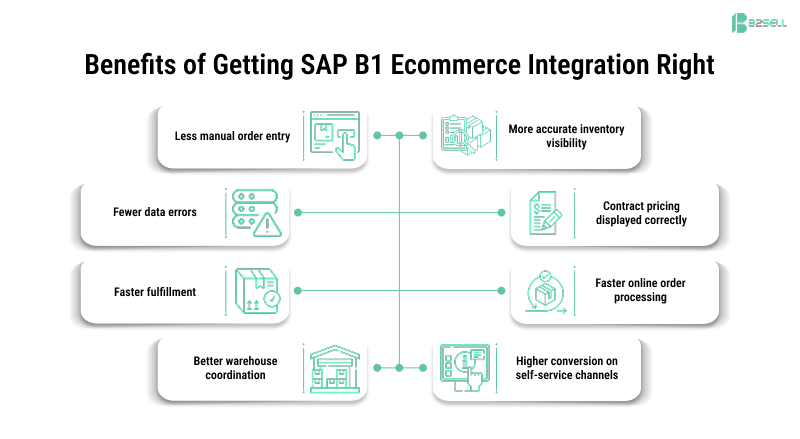
- 80% faster order processing versus manual entry workflows
- 60% fewer manual data entry errors through master data sync via Service Layer
- 2× to 4× faster integration completion using REST and connection pooling versus legacy methods
- 20+ hours per week reclaimed by eliminating order rekeying for a typical mid-sized distributor
- 30%+ growth in online order volume within the first quarter post-launch when contract pricing becomes visible
- 99%+ inventory accuracy on the storefront with real-time sync, up from typical 75–85% with batch sync
- 40 to 60% lower total cost of ownership with a native platform versus a custom Magento build over a five-year horizon
These ranges hold across industries — industrial distribution, dental and medical supply, wholesale food, building products, electrical and plumbing, automotive parts. The architecture pattern matters more than the vertical.
If you want to validate these numbers against your own SAP B1 environment, request a free walkthrough — B2Sell will show real distributor data flows and quantify the gap between your current setup and what an integrated stack delivers.
How to Choose the Right SAP Business One Ecommerce Solution
The best solution depends on your business model and operational goals.
Use these questions to guide the decision:
- Are you primarily B2B, B2C, or both?
- Do you need real-time pricing and inventory?
- How many sales channels do you support?
- Do you have internal developers?
- Are you on SAP B1 HANA or SQL?
- Do you need customer-specific pricing or contract logic?
- Is speed to market more important than custom UX?
Recommended fit by business type
- B2B distributors: Native SAP B1 ecommerce platform
- Multi-channel sellers: iPaaS or middleware integration
- Custom workflow businesses: Custom build with Service Layer
- ERP-heavy enterprises: SAP B1 + integration middleware + PIM
If you are already comparing solutions, look at total cost of ownership, support complexity, and how well the platform handles your pricing and inventory rules.
FAQs: SAP B1 Ecommerce Integration 2026
What is SAP B1 ecommerce integration?
SAP B1 ecommerce integration is the technical link between SAP Business One ERP and an online sales channel that keeps products, pricing, inventory, customers, and orders in sync automatically.
How does SAP Business One integrate with ecommerce platforms?
SAP Business One integrates with ecommerce platforms through the Service Layer REST API, DI API, SAP B1 Integration Framework, or third-party iPaaS connectors.
What is the best ecommerce platform for SAP Business One in 2026?
For B2B distribution and manufacturing, native SAP B1 ecommerce solutions are usually the best fit. For multi-channel businesses, iPaaS can be a strong option.
How much does SAP B1 ecommerce integration cost?
Costs range from around $5,000 for a simple native setup to $150,000+ for a custom Magento or headless build, depending on complexity.
Can SAP Business One integrate with Shopify?
Yes. SAP Business One can integrate with Shopify through native connectors, middleware platforms, or custom Service Layer development.
Can SAP Business One integrate with Magento?
Yes. Magento can integrate with SAP Business One, but the setup is usually more complex and expensive than native or middleware-based approaches.
What is the SAP Business One Service Layer?
The SAP Business One Service Layer is a RESTful API that allows external systems to read and write SAP B1 data using JSON over HTTP.
Is the Service Layer better than the DI API?
For new integrations, the Service Layer is usually the better option because it is modern, web-friendly, and easier to maintain. DI API still has value in legacy environments.
How long does SAP B1 ecommerce integration take?
A native integration may take 2 to 4 weeks, while custom builds can take several months depending on scope.
Does SAP Business One support real-time inventory sync?
Yes, SAP Business One can support real-time or near-real-time inventory sync when connected properly through the Service Layer, B1if, or an integration platform.
Final Thoughts
SAP B1 ecommerce integration in 2026 is not just an IT project. It is a business-critical capability.
If your storefront does not reflect the truth in SAP Business One, you will lose time, trust, and revenue. But when the integration is done correctly, your ecommerce channel becomes a reliable extension of your ERP, not a separate system that your team has to babysit.
The smartest approach is usually the simplest one that can still handle your pricing logic, inventory rules, customer accounts, and order flow. For many distributors and manufacturers, that means choosing a solution built specifically for SAP Business One rather than forcing a generic ecommerce platform to do ERP work.
The result is a business that sells faster, serves customers better, and spends less time on manual corrections.
Ready to Connect SAP Business One to a Real B2B eCommerce Engine?
B2Sell helps distributors and manufacturers create native SAP Business One ecommerce experiences built for real operational needs — live inventory, customer-specific pricing, seamless order flow, and less manual work.
See how your SAP B1 data can power a connected ecommerce experience.
.png)
.png)
.png)


.png)