


Introduction: Why This Integration Matters for Distributors
Running a distribution business in 2026 means your customers expect Amazon-level service. They want to see real stock levels, get their contract price after login, place an order at 10 p.m., and check tracking the next morning. None of this works if your Epicor Prophet 21 ERP and your Shopify store live in separate worlds.
The problem is simple. Prophet 21 holds all the truth about your business: inventory, pricing, customers, orders, invoices. Shopify is where your buyers actually shop. When the two systems don't talk to each other, your team spends hours re-keying orders. Stock on the website shows ten in stock when the shelf is empty. B2B customers see retail prices instead of their contract rates. Phones ring with shipping questions because Shopify has no idea the order left the warehouse yesterday.
This guide walks through how Epicor P21 Shopify integration actually works. No fluff, no sales pitch, just the real steps, the common traps, and the outcomes to expect. If you read all the way through, you'll know exactly what to plan for before you kick off the project.
For a deeper look at the business impact—ROI, customer experience, and why this integration matters now—check out our companion post: Prophet 21 & Shopify Integration for B2B Distributors.
For the business case side (ROI, customer experience, why now), you can read our companion post: Prophet 21 & Shopify Integration for B2B Distributors. This guide is about the "how."
What Is Epicor P21 Shopify Integration?
Epicor P21 Shopify integration is the process of connecting Epicor Prophet 21 ERP with a Shopify storefront so that data flows automatically between the two. When done well, your Shopify site becomes a live window into your Prophet 21 data.
A complete Prophet 21–Shopify integration seamlessly manages six critical data flows between your ERP and ecommerce platform.
- Products move from P21 to Shopify (SKUs, descriptions, images, categories, UOM)
- Inventory syncs from P21 to Shopify, often by warehouse
- Pricing flows from P21 to Shopify, including list price and customer-specific contract pricing
- Customers sync both ways so accounts, addresses, and terms stay aligned
- Orders flow from Shopify to P21 as sales orders ready for fulfillment
- Fulfillment status flows from P21 back to Shopify (tracking, ship date, invoice)
When these six flows work, your team stops re-keying orders and your customers stop calling to ask basic questions.
Why Distributors Struggle Without Integration
Most distributors running P21 and Shopify separately face the same five pain points.
Manual order entry eats time. A team member copies each Shopify order into P21 by hand. Five orders is fine. Fifty orders a day means a full-time person just pushing data.
Inventory shows wrong numbers. Stock levels update on Shopify once a day, or once a week, or whenever someone remembers. Customers order items you don't have. You cancel orders, apologize, and lose trust.
Pricing does not match reality. B2B buyers have contract pricing in P21. Shopify shows list price. Either the customer sees the wrong price online, or your team manually adjusts every invoice after the fact.
Customer service operates blind. A buyer calls asking where her order is. The CSR checks Shopify, which says "processing." The CSR checks P21, which says "shipped three days ago." Nobody looks good.
Scaling breaks everything. At 20 orders a day, manual work is painful but possible. At 200 orders a day, it's not possible. Growth stops because operations can't keep up.
These are not edge cases. They are the default state for any distributor who has not integrated the two systems yet.
Step-by-Step Prophet 21 Shopify Integration Process
Here is the exact seven-step process that distributors follow for a successful P21 ERP Shopify integration.
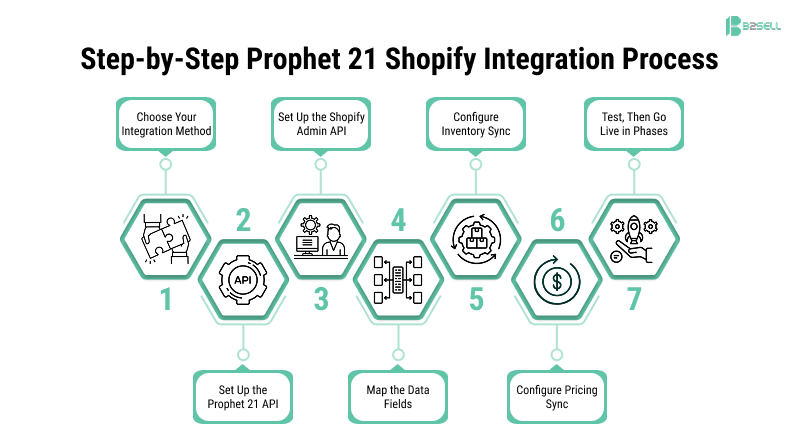
Step 1: Choose Your Integration Method
You have three paths.
- Pre-built P21 Shopify connector. A vendor has already built the middleware, mappings, and retry logic. You configure it, not code it. Fastest and most common choice for distributors.
- iPaaS platform (Celigo, Dell Boomi, MuleSoft). You draw workflows on a canvas. More flexible, higher ongoing cost, needs a specialist.
- Custom development. Your team codes directly against the P21 API and Shopify Admin API. Maximum control, highest cost, longest timeline.
Most distributors pick the pre-built connector. It covers 90% of what you need and saves months.
Step 2: Set Up the Prophet 21 API
Before anything else, make sure your P21 middleware is ready.
- Confirm the middleware service is running on your P21 server
- Create a dedicated service account (for example, shopify_integration), not a person's login
- Give the account only the P21 roles and permissions it needs
- Open the firewall to allow traffic from the connector's IP range
- Enable OAuth 2.0 or token-based authentication if your connector supports it
If you run P21 SaaS, open a ticket with Epicor to request API access. On-prem customers can check with their IT team.
Step 3: Set Up the Shopify Admin API
In your Shopify admin, create a custom app with the scopes your connector needs. At minimum:
- Read and write access to products, inventory, orders, customers, and fulfillments
- For Shopify B2B on Plus: read and write access to companies and price lists
Copy the Admin API token into a secure credential vault. Never paste it into an email or commit it to a code repository.
Step 4: Map the Data Fields
This is where projects succeed or fail. For every piece of data, decide which P21 field goes into which Shopify field.
For products, a simple mapping looks like this:
- P21 item_id becomes Shopify variant.sku
- P21 item_desc becomes Shopify product.title
- P21 extended_desc becomes Shopify product.body_html
- P21 web_item_category becomes Shopify product.product_type
- P21 list_price becomes Shopify variant.price
- P21 web_published flag controls Shopify product.status
Build the same mapping for customers, orders, and fulfillments. Document every decision in a shared spreadsheet. Six months from now, when someone asks "why does this field show up blank?", you will thank yourself.
Step 5: Configure Inventory Sync
Three decisions to make.
Three decisions to make.
- How often? Every 2 to 5 minutes is standard. True real-time needs webhooks and is rarely worth the extra engineering.
- Which warehouses? Some show only one warehouse, some sum all warehouses, some display stock by location. Pick the rule that matches how your buyers shop.
- Exact or buffered? Many distributors show actual stock minus a small buffer (for example, show 47 when you have 50) to avoid overselling between sync cycles.
Step 6: Configure Pricing Sync
Pricing has two layers.
List pricing can sync on a schedule, every few hours is fine. Contract pricing from the P21 price matrix must be called in real time when a logged-in customer views a product. This is what separates enterprise-grade Prophet 21 Shopify sync from basic connectors.
If you expect many customers shopping at once, plan for extra P21 API capacity. Real-time pricing calls under load can slow down the server if the infrastructure isn't sized correctly.
Step 7: Test, Then Go Live in Phases
Never go straight to production. Run every flow against a P21 sandbox and a Shopify development store. Test cases to run:
- A new item added in P21 appears on Shopify within the sync window
- Inventory dropped to zero in P21 shows as out of stock in Shopify
- A logged-in B2B customer sees contract pricing, not list pricing
- An order placed in Shopify creates the right sales order in P21
- A shipped order in P21 shows tracking in the Shopify customer account
- A customer on credit hold is handled by your defined rule
After the sandbox passes, go live in phases. Start with one warehouse or one customer segment for two weeks, watch the data, then expand.
Benefits of a Connected P21 + Shopify Setup
The gains from Shopify integration for Epicor P21 are measurable. Here's what distributors typically see after go-live:
- Order entry time drops 80–95% because Shopify orders flow straight into P21
- Stock-related order cancellations fall by 70% or more when inventory syncs every few minutes
- Customer support tickets about order status drop sharply because Shopify now shows shipping and tracking
- B2B order frequency grows once contract pricing shows correctly online
- Admin cost per order drops as the team stops re-keying data
- Site revenue scales without adding staff because the system handles the work
The bigger benefit is qualitative. Your team stops firefighting. Customers stop complaining. You can grow without hiring a back-office person for every extra 50 orders a day.
Why Distributors Choose the B2Sell P21 Shopify Connector
After walking through the integration process, one thing becomes obvious:
the technical setup isn’t the hardest part.
The real challenge is getting every detail right — item mapping, real-time pricing, warehouse logic, error handling, and all the edge cases that can quietly break your operations.
Because in distribution, even small gaps create big problems.
What you need isn’t just an integration.
You need a system that works so reliably your team forgets it’s even there.
That’s exactly what the B2Sell P21 Shopify Connector is built for.

B2Sell has been integrating Epicor Prophet 21 with eCommerce platforms since 2007. That’s nearly two decades of hands-on experience understanding what fails, what scales, and what distributors truly need.
This isn’t a generic iPaaS solution forced to fit Prophet 21.
It’s purpose-built for distributors — from the ground up.
Built for distributors — not retailers
Every feature aligns with real-world P21 workflows. Contract pricing, multi-warehouse inventory, UOM conversions, credit limits, and payment terms are handled natively — no workarounds required.
Real-time, bi-directional synchronization
Orders, inventory, pricing, customers, and fulfillment data move seamlessly between Prophet 21 and Shopify — automatically, accurately, and instantly.
Deep Prophet 21 expertise
B2Sell understands the P21 ecosystem inside out — including database structures, middleware APIs, and the edge cases that generic integrators miss. We support both on-premise and SaaS environments.
True customer-specific pricing — in real time
When a B2B customer logs in, the connector pulls live contract pricing directly from the P21 price matrix. No cached data. No approximations. Just the exact price your sales team would provide.
Advanced multi-warehouse logic
Display inventory your way — pooled, location-specific, or nearest warehouse. Configure it once and let the system handle the rest.
Flexible where it matters
Most distributors run smoothly on standard configurations. But when your business requires something unique, we extend the connector — not force you to compromise.
Fast, predictable deployment
Typical go-live happens in 6–12 weeks — not months or years.
Ongoing support and future-proofing
As Prophet 21 evolves and Shopify updates its APIs, B2Sell keeps your integration current — so your system never falls behind.
Built for Real Distribution Complexity
B2Sell powers Shopify integrations for distributors across:
- HVAC
- Plumbing
- Industrial supply
- Electrical
- Medical
- Automotive
- Building materials
Different industries. Different workflows. Same outcome — a fully connected system that works.
FAQ
How long does Epicor P21 Shopify integration take?
Most distributors finish in 6 to 12 weeks with a pre-built connector. Custom builds take 3 to 6 months. Item master cleanup can extend either timeline.
Does Prophet 21 have a REST API?
Yes. The Prophet 21 middleware supports REST and SOAP, with OAuth 2.0 authentication. The Transaction API handles orders and items. The Data API handles reads.
Can Shopify handle B2B pricing from Prophet 21?
Yes, on Shopify Plus with B2B features enabled. Customer-specific prices from the P21 price matrix can display in real time when the buyer logs in.
Does the integration support multi-warehouse inventory?
Yes. Each P21 warehouse maps to a Shopify location. You can display pooled, per-location, or nearest-location stock.
What happens if the P21 server goes down?
A good connector queues Shopify orders and retries them when P21 comes back online. Real-time pricing falls back to cached prices during the outage.
Is this different from Epicor Kinetic integration?
Yes. Prophet 21 and Kinetic are different ERPs with different APIs. A connector built for one does not work for the other.
Can customers sync both ways?
Yes. New Shopify B2B registrations can create P21 customer records (usually for CSR review), and P21 updates flow back to Shopify.
Conclusion: The Transformation
Before integration, your distribution business runs on manual effort. Orders get re-keyed. Inventory drifts from reality. Customers call to ask basic questions your website should already answer. Growth means hiring more back-office staff.
After Prophet 21 Shopify integration is live, the business runs on data that moves itself. Orders flow from Shopify into P21 in seconds. Stock shows the truth. B2B buyers see the right price after login. Tracking appears in the customer account automatically. Your team stops pushing paper and starts helping customers.
This is not a small upgrade. It is the difference between a distribution business stuck at its current size and one that can grow without breaking its operations. Distributors who integrate P21 with Shopify are the ones positioned to compete against Amazon, Grainger, and every digital-first competitor coming into their market.
The technology exists. The path is clear. The only question is when you start.
See the B2Sell P21 Shopify Connector in Action
If your business runs on Epicor Prophet 21 and you're looking for a Shopify experience that operates as a true extension of your ERP — not a disconnected storefront — it’s time to see what’s possible.
Book a free demo of the B2Sell P21 Shopify Connector.
In just 30 minutes, you’ll see:
- How real-time inventory and contract pricing appear on a live Shopify store
- How Shopify orders flow into Prophet 21 and return as tracked shipments
- What a tailored integration looks like for your SKUs, warehouses, and pricing rules
- A clear timeline and investment range for your business
No pressure. No generic pitch.
Just a practical session focused on your setup.
👉 Book Your Free Demo
Prefer a quick conversation first? Reach out to the B2Sell team and we’ll schedule a time that works for you. You can also explore the Shopify Solutions page or dive deeper into the broader integration strategy.
.png)
.png)
.png)


.png)