


What Is Purchase Order Automation?
Purchase order automation is the use of AI to read incoming purchase orders, pull out the key data, check it against your ERP, and enter the order — without manual typing. A PO lands in your inbox as an email or PDF. The AI reads it, confirms the prices and quantities match your system, and creates the order in seconds. Your team only steps in when something looks off.
This is not a template or a macro. Those break the moment a document changes shape. AI handles the messy reality of distribution: scanned files, odd layouts, missing fields, and POs that never follow the same format twice.
For distributors, this is critical because the purchase order is where revenue, accuracy, and customer satisfaction all come together. Every order entered by hand is a chance for a wrong price, a wrong part, or a slow shipment. Automated PO processing removes that risk at the source.
Why Manual PO Processing Hurts Distributors
Most distributors still process purchase orders by hand. A team member opens an email, downloads the file, finds the matching record in the ERP, and types in the data line by line. Then they move to the next email and start again.
This routine looks small. Across a full day and a full team, it is not.
The Hidden Cost of Typing
Here is what manual PO entry really costs a distributor:
- Lost time. A single PO can take 15 to 20 minutes to enter by hand.
- Human error. Typos in prices, part numbers, or quantities lead to wrong shipments and refunds.
- Order delays. POs sit unread in inboxes during busy hours.
- Wasted skill. Trained staff spend their day on data entry instead of helping customers.
- No room to grow. More orders means hiring more people, not getting more done.
Why It Gets Worse at Scale
A distributor handling 50 orders a day can survive manual entry. One handling 300 cannot. The backlog grows, errors climb, and the team burns out. Busy seasons turn into a scramble.
This is the core problem an automated purchase order system solves. It breaks the link between order volume and headcount. You can take on more business without adding more typists.
How AI Reads a PO: From Email to ERP
Here is how automated PO processing works, one step at a time. Each step replaces a task someone does by hand today.
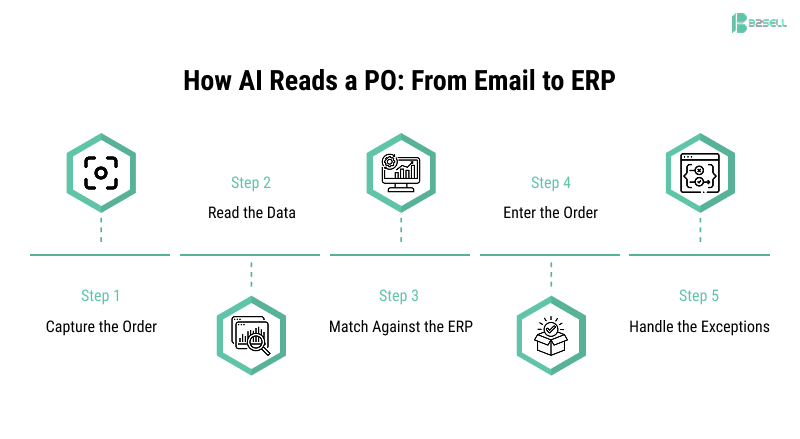
Step 1: Capture the Order
The AI watches your inbox, shared folders, supplier portals, and EDI feeds. The moment a PO arrives, it grabs it. No one downloads or forwards anything. The work starts on its own.
Step 2: Read the Data
The AI reads the document, even a PDF, a scan, or plain email text. It pulls out the parts that matter:
- Part numbers and product lines
- Quantities ordered
- Prices and totals
- The PO number
- Delivery dates and shipping details
It then turns this into clean, structured data your ERP can accept. This is the core of AI order entry for distribution. The AI does the reading and the typing in one pass.
Step 3: Match Against the ERP
The AI checks the order data against your live ERP records. This is the heart of automated purchase order matching solutions. It confirms:
- The PO number exists and the order is open
- Prices match your contract or quoted rates
- Quantities are consistent across documents
- Delivery dates are realistic
- The supplier terms are correct
Nothing is guessed. Every field is compared to real data already in your system.
Step 4: Enter the Order
When everything checks out, the AI creates the order in the ERP and sends a confirmation. A clean PO can go from email to entered order in seconds. Your team never touches it.
Step 5: Handle the Exceptions
If something does not match — a price gap, a missing part, a wrong quantity — the AI flags it. It sends the issue to the right person with a clear note on what is wrong and a suggested fix.
This step matters most, so it is worth slowing down on.
Exception Handling: Where AI Earns Its Keep
The goal of purchase order automation is not to remove people. It is to point people at the orders that truly need them.
A good system sorts every PO into one of three buckets:
- Clean orders. Everything matches. These auto-process with no human touch. For most distributors, this is the majority of orders.
- Small mismatches. A price is off by a small set amount, or a date is slightly outside the window. The AI can flag these with a recommended action, and a person approves in one click.
- Real problems. A part does not exist, or a price is far off. These go straight to the right team member with full context.
Why This Beats a Manual Queue
In a manual process, every order waits in the same line. A simple order sits behind a complex one. With AI, the simple ones clear instantly, and your people spend their time only on the hard 10 to 15 percent.
The AI also explains itself. Instead of "this order failed," your team sees "the quoted price was $4.20 but the PO lists $4.50, a difference of $0.30 per unit." That context turns a five-minute investigation into a ten-second decision.
Before and After: The Time Difference
Here is what changes when you automate the purchase order process.
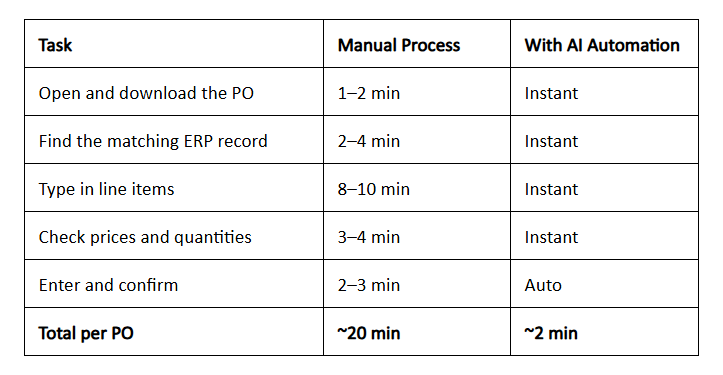
The 2-minute figure covers a quick human review. Clean orders need no touch at all. The time savings compound with volume: at 200 orders a day, that gap is the difference between three full-time roles and almost none.
Use Case 1: A Distributor Drowning in Email POs
Picture a mid-sized distributor that gets 200 purchase orders a day, mostly by email.
Before automation:
- Three staff members handle PO entry full-time.
- Each PO takes about 20 minutes.
- Pricing errors can lead to multiple customer disputes every week, creating delays, extra work, and lost trust.
- Orders received after 3 PM often wait until the next morning.
After automation:
- The AI reads and enters most POs on its own.
- Staff review only flagged exceptions, around 10 percent of orders.
- Pricing errors drop sharply because every line is checked against the ERP.
- Orders continue processing 24/7, including after business hours, on weekends, and during peak demand periods.
The same three people now manage exceptions and serve customers instead of typing. The business handles more volume without new hires. Late-day orders ship the same day.
Use Case 2: Mixed EDI and PDF Orders
Now picture a distributor whose orders come from two sources. Large customers send clean EDI files. Smaller customers email PDFs and scanned forms.
The old approach needed two separate processes and two skill sets. The EDI files mostly flowed through, but the PDFs piled up because they needed a human to read and type them.
With AI order entry, both paths feed one system:
- EDI orders are read and matched as before.
- PDF and scanned orders are read by the same AI and pushed through the same checks.
- Every order, no matter the source, lands in the ERP the same way.
The result is one clean pipeline. The team stops sorting orders by format and starts handling only the few that fail a check.
How to Automate Purchase Orders: A Simple Path
If you are wondering how to automate purchase orders in your own operation, the path is short:
- Pick your highest-volume source. For most distributors, this is email.
- Connect the AI to your ERP. B2Sell works with Epicor Prophet 21, SAP Business One, NetSuite, Infor, and Sage.
- Set your match rules. Decide what counts as a clean order and what counts as an exception.
- Define routing. Choose who handles each type of flagged issue.
- Go live and review. The system learns your patterns and improves over time.
Most distributor workflows can be automated in weeks, not months. You do not need to rebuild your ERP or change how customers send orders.
Common Mistakes When Automating POs
Automation works, but a few missteps slow it down. Avoid these.
Trying to Automate Everything on Day One
Start with your cleanest, highest-volume order type. Prove it works, then expand. Teams that try to handle every edge case at once stall before launch.
Skipping the Exception Rules
The AI is only as good as the rules you give it. If you do not define what a "small mismatch" is, the system will either flag too much or too little. Spend time here. It pays off.
Treating It as Set-and-Forget
A PO automation system learns from feedback. When your team corrects a flagged order, the system gets smarter. Ignore that loop and accuracy stalls. Use it and accuracy climbs.
Ignoring the People
Your team fears that automation means job cuts. Be clear that it means less typing and more useful work. The staff who once entered orders become the ones who manage exceptions and serve customers.
What About Complex Pricing?
One common concern is whether AI can accurately manage complex pricing structures and customer-specific pricing rules. It can. A strong AI order entry and distribution system reads your ERP pricing tables directly. That includes:
- Contract pricing
- Customer-tier pricing
- Rebates
- Supplier agreements
Because the AI checks against live ERP data, it applies the right price every time. It does not guess, and it does not work from a stale copy. If a customer has a special rate, the AI uses that exact rate.
The Benefits of Automated PO Processing
An automated purchase order system gives you gains you can measure.
Speed
- PO creation drops from about 20 minutes to about 2 minutes.
- Orders process instantly instead of waiting in a queue.
Accuracy
- Every line is checked against real ERP data.
- Pricing mismatches are caught before they cause disputes.
Lower cost
- No need to add staff as order volume grows.
- Skilled people move to higher-value work.
Better service
- Faster order entry means faster fulfillment.
- Fewer errors means fewer angry calls.
Visibility
- Dashboards show volume, exceptions, and time saved.
- You can prove the return on your investment with real numbers.
How to Measure the Return
You do not have to take automation on faith. Track these numbers before and after:
- Average time per PO. The clearest measure of speed.
- Percent of orders auto-processed. This should climb as the system learns.
- Error and dispute rate. Watch this fall.
- Orders per staff member. This rises without new hires.
- Same-day processing rate. Late orders stop spilling into the next day.
When these numbers move, the value is plain. Most distributors see the shift within the first few weeks.
B2Sell AI Workflow Automation
Most PO automation tools stop at reading the document. They pull out the data, then hand it back for someone to check and key in. That leaves half the work on your team.
B2Sell AI Workflow Automation goes further. It reads the order, checks it against your ERP, and acts on it — all in one flow. It was built for distributors, not adapted from a generic tool.
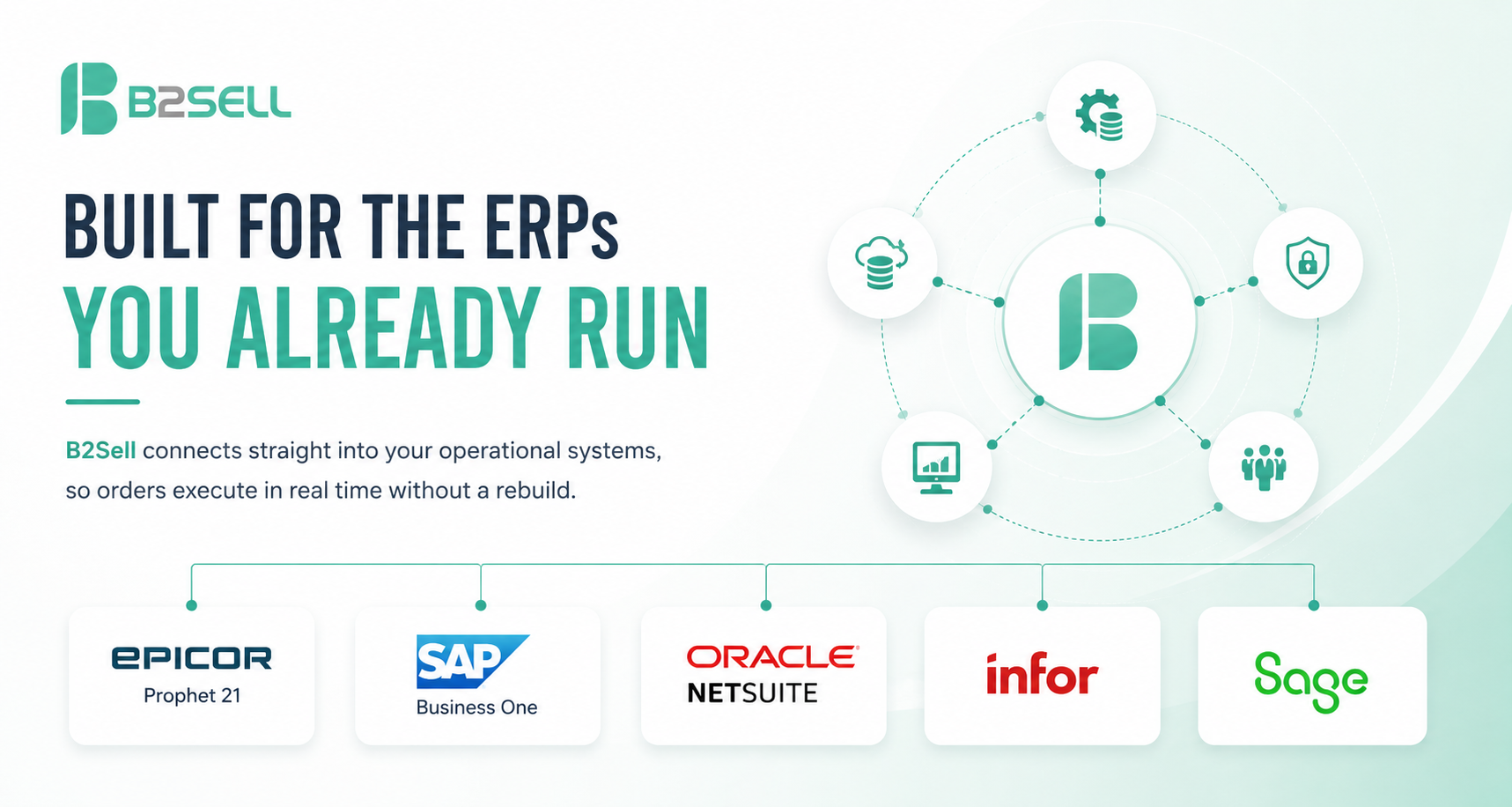
Built for the ERPs You Already Run
B2Sell connects straight into your operational systems, so orders execute in real time without a rebuild. Supported platforms include:
- Epicor Prophet 21
- SAP Business One
- NetSuite
- Infor
- Sage
It also reads from the channels your orders already arrive on: email inboxes, SharePoint and shared drives, supplier portals, and EDI feeds.
What the AI Agents Actually Do
B2Sell uses AI agents that watch, read, check, and act like a trained operations team member:
- Capture orders the moment they arrive, with no manual download.
- Extract line items, prices, quantities, and PO numbers from PDFs, scans, and email.
- Validate every field against live ERP records, including contract and tier pricing.
- Execute clean orders on their own and route exceptions to the right person with full context.
- Learn from each correction, so accuracy climbs the more it runs.
Beyond Purchase Orders
PO entry is one workflow. The same engine handles related work across your operation, so the value grows as you expand it:
- Invoice matching against POs and receipts
- Order exception handling and routing
- Supplier communication, like confirmations and status updates
You can start with purchase orders and add the rest as you go. The team that runs your POs today can run all of it tomorrow, without new headcount.
Conclusion: From Inbox to Order, Automatically
Manual PO entry is slow, costly, and easy to get wrong. Purchase order automation flips that. The AI reads the order, checks it against your ERP, enters it, and flags only the orders that need a person.
The result is fewer errors, faster orders, and a team freed from data entry. Your highest-volume bottleneck becomes a quiet background process that runs day and night. For distributors fighting for margin and speed, automated PO processing is one of the clearest wins AI offers right now.
The orders are already arriving in your inbox. The only question is whether a person types them in, or the system does.
Ready to See It Work?
See how B2Sell AI Workflow Automation reads your purchase orders and enters them straight into your ERP.
Request a Free Demo and bring a few of your own PO emails. We will show you exactly how fast they go from inbox to entered order — no slides, just your real documents.
Frequently Asked Questions
What is purchase order automation?
It is the use of AI to read incoming purchase orders, pull out the data, check it against your ERP, and enter the order with little or no manual typing.
Can AI handle PDF and scanned purchase orders?
Yes. AI document processing reads PDFs, scans, spreadsheets, and email text, then turns them into structured, ERP-ready data.
How much time does automated PO processing save?
Distributors typically cut PO entry from about 20 minutes to about 2 minutes per order. Clean orders need no human touch at all.
Does purchase order automation work with my ERP?
B2Sell works with Epicor Prophet 21, SAP Business One, NetSuite, Infor, and Sage, so orders flow straight into your existing system.
How does the system handle errors or mismatches?
When data does not match the ERP, the AI flags it right away and routes it to the right person with a clear explanation and a suggested fix.
Can AI handle contract and tier pricing?
Yes. The AI reads your ERP pricing tables directly, including contract pricing, customer tiers, rebates, and supplier agreements, so the right price applies every time.
Will I lose control over my orders?
No. You set the rules for what auto-processes and what gets reviewed. The AI handles the routine work, and your team handles the exceptions.
How long does it take to set up?
Most distributor PO workflows can be automated within weeks, depending on how many order sources and rules you start with.
.png)
.png)
.png)


.png)