
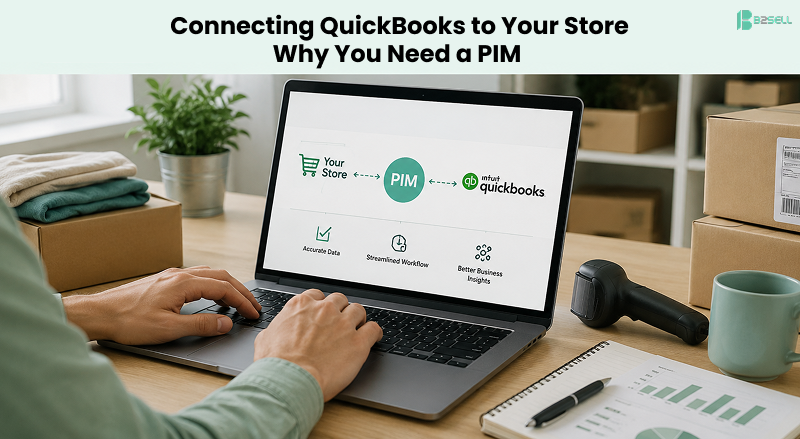


Here is a situation that plays out in thousands of distribution and manufacturing businesses. The company runs QuickBooks. It has for years. Every SKU, price, and stock count lives there. Then the company launches an online store, or adds a second one, or starts listing on Amazon and Walmart. Someone connects QuickBooks to the store with a plugin, and for a few weeks it works.
Then the problems start. Product descriptions on the website get overwritten by the eight-word item names from QuickBooks. Images have to be uploaded to each channel by hand. A price change in QuickBooks reaches Shopify but not eBay. A new product takes three days to appear everywhere because someone has to touch five different admin panels.
None of this is a QuickBooks problem. QuickBooks is doing exactly what it was built to do. The problem is that a direct QuickBooks-to-store connection asks accounting software to do a job it has no fields for. The fix is a PIM layer, and this article explains what that means, when you need one, and how the architecture works.
What is a PIM layer for QuickBooks?

A PIM (Product Information Management) system sits between QuickBooks and your sales channels. QuickBooks stays the source of truth for pricing, inventory quantities, and accounting. The PIM becomes the source of truth for product content: descriptions, images, specifications, categories, variants, documents, and SEO fields. It then publishes that content to every channel you sell on, formatted in the way each channel expects.
Think of it as a division of labor. QuickBooks answers "what does it cost, how many do we have, and where does the revenue post." The PIM answers "how do we describe it, show it, categorize it, and present it to a buyer."
What QuickBooks Actually Stores About Your Products
Open an item record in QuickBooks Online or Desktop and count the fields. You get:
- Item name and SKU
- Type (inventory, non-inventory, service, bundle)
- Sales price and cost
- Quantity on hand and reorder point
- Income, expense, and asset accounts
- A short description field
- Tax settings
That is the whole record. It is a financial view of a product, and for accounting purposes it is complete.
What an Online Store Actually Needs
Now count what a competitive product listing requires:
- A long-form description written for buyers, not bookkeepers
- Multiple high-resolution images, and often video
- Structured attributes: dimensions, material, voltage, thread size, color, compatibility
- Variants and parent-child relationships (one shirt, twelve size-color combinations)
- Category and subcategory placement, which differs per channel
- SEO title, meta description, and URL slug
- Spec sheets, safety data sheets, installation guides as attached PDFs
- Cross-sells, related products, and replacement part links
- Channel-specific content: Amazon bullet points, Google Shopping feed attributes, marketplace category codes
QuickBooks has fields for almost none of this. That gap is the entire argument for a PIM, and no connector plugin can close it, because a connector can only move data that exists.
Why Direct QuickBooks-to-Store Connectors Break Down
Direct connectors are not useless. If you sell 80 SKUs on a single Shopify store, a connector that syncs price and inventory may be all you need. The breakdown happens in predictable stages.
Stage one: the field mismatch. Your web team writes a proper product description in Shopify. The connector runs its nightly sync and, depending on its settings, overwrites it with the terse item name from QuickBooks. Or it doesn't overwrite, and now you have two versions of the truth that drift apart. Either way, somebody starts maintaining a spreadsheet on the side, and that spreadsheet becomes the real product database. Unversioned, unbacked-up, and living on one person's laptop.
Stage two: the second channel. You add BigCommerce, or Amazon, or a dealer portal. Each channel has its own category tree, its own image requirements, its own attribute names. QuickBooks can push the same flat record to all of them, but it cannot say "this product goes in Plumbing > Fittings on the website and in Industrial & Scientific > Hydraulics on Amazon." Now every new product means logging into every channel separately.
Stage three: scale. At 1,000+ SKUs, manual enrichment per channel stops being annoying and starts being a payroll line item. A catalog refresh that should take an afternoon takes a quarter. Product launches slip. Listings go live half-finished because finishing them all is impossible.
If any of these stages sound familiar, you have outgrown the direct-connector architecture.
The Three-Layer Architecture
The setup that holds up looks like this:
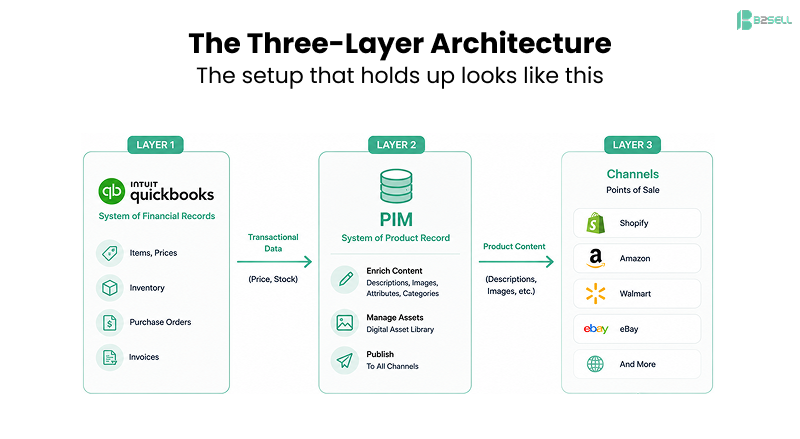
Layer 1 — QuickBooks (system of financial records).
Items, costs, sell prices, quantity on hand, purchase orders, and invoices. Nothing changes about how your accounting team works.
Layer 2 — PIM (system of product record).
The PIM imports your item list from QuickBooks via API or scheduled file sync, so SKUs, prices, and stock levels flow in automatically. Your team then enriches each product once: writes the description, uploads images to the built-in digital asset management library, fills in attributes, assigns categories per channel.
Layer 3 — Channels (points of sale).
The PIM is published to Shopify, BigCommerce, Magento, Amazon, Walmart, eBay, your print catalog, and your dealer portals. Each channel gets the content formatted for its requirements. A price change in QuickBooks flows through the PIM to every channel in one pass.
The direction of data matters. Transactional data (price, stock) flows from QuickBooks outward. Content flows from the PIM outward. Nothing flows backward into QuickBooks except what belongs there, like orders. Your accountant's data stays clean, and your marketer's content stays intact. The overwrite wars end because each system owns what it is best at.
What Changes Day to Day
Abstract architecture is less convincing than a Tuesday morning, so here is the same task in both worlds.
Adding a new product without a PIM: Create the item in QuickBooks. Log into Shopify, create the product, paste the description, upload six images, set the category, write the meta description. Log into BigCommerce and repeat. Log into Amazon Seller Central and repeat with different image specs and bullet-point rules. Update the price list PDF. Total: two to four hours per product, spread across three people, with three chances for a typo.
Adding a new product with a PIM: The item syncs in from QuickBooks overnight. One person opens the PIM, completes the enrichment checklist (the system flags missing fields before publishing), attaches images from the asset library, and hits publish. Every channel updates. Total: twenty to forty minutes, one person, one version of the truth.
Multiply that difference by every new product, every price update, every seasonal description refresh, and every image swap for a year. That is the ROI calculation, and for most catalogs past a few hundred SKUs it is not close.
Signs You Need the PIM Layer Now
You are past the tipping point if two or more of these are true:
- You sell on two or more channels, or plan to within a year
- Your catalog is above roughly 200–500 SKUs
- Product data lives in spreadsheets that only one employee understands
- Descriptions or images differ between your website and your marketplace listings, and nobody knows which is current
- A new product takes days to appear on all channels
- You have ever had a sync overwrite content your team spent hours writing
- Customers call to ask questions the product page should have answered (dimensions, compatibility, material)
That last one is worth pausing on. Thin product data is not just an internal inefficiency. It is lost revenue. Buyers who cannot find the spec they need do not email you. They buy from the competitor whose listing had it.
QuickBooks Online vs. QuickBooks Desktop
Both versions work in this architecture, with different plumbing.
QuickBooks Online exposes a REST API, so a PIM can sync items, prices, and quantities on a schedule or near real time. This is the cleaner integration path and the one Intuit is investing in.
QuickBooks Desktop and Enterprise integrate through the QuickBooks Web Connector or middleware, or through scheduled file exports. Slightly more setup, same end result. Many distributors run Desktop Enterprise for its inventory features and pair it with a PIM without issues.
If you are on Desktop and considering a migration to Online, putting the PIM in place first actually de-risks the migration: your product content is already externalized, so the accounting cutover touches nothing customer-facing.
How B2Sell PIM Works with QuickBooks
B2Sell PIM for QuickBooks was built for exactly this architecture, with a bias toward B2B manufacturers and distributors, catalogs with deep attribute requirements, and multi-channel selling.
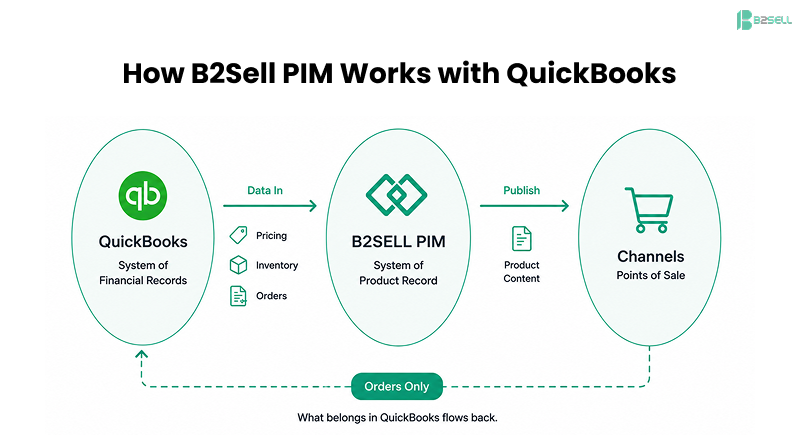
The working model:
- Automated import from QuickBooks. SKUs, pricing, and inventory sync in, so the financial system of record stays in accounting where it belongs.
- Central enrichment. Descriptions, structured attributes, categories, and variants are managed in B2Sell Central, with data validation that flags incomplete records before they publish.
- Built-in DAM. Images, videos, spec sheets, and PDFs attach directly to products, with per-channel formatting handled at publish time.
- AI enrichment. AI product data enrichment drafts descriptions and fills attributes from supplier data, which matters when you are enriching 5,000 SKUs rather than 50.
- Multi-channel publishing. One record pushes to Shopify, BigCommerce, Magento, marketplaces, and automated print catalogs from the same source.
For companies running a B2B ecommerce operation on top of QuickBooks, the PIM also handles the things B2B buyers expect that consumer platforms ignore: customer-specific catalogs, unit-of-measure variations, and technical documentation attached at the SKU level.
Implementation: What the First 60 Days Look Like
A QuickBooks-to-PIM rollout is not an ERP migration. The realistic sequence:
Weeks 1–2: Connect and import.
Link QuickBooks (API for Online, connector for Desktop). Import the item list. Audit what came in; this step alone usually surfaces duplicate SKUs and dead items worth cleaning.
Weeks 2–4: Model and map.
Define your attribute sets per product family (fasteners need different fields than pumps). Map PIM categories to each channel category tree once; the mapping is reused forever after.
Weeks 4–8: Enrich and publish.
Start with your top-selling 20% of SKUs, since they carry most of the revenue. Use AI enrichment for the long tail. Publish channel by channel, starting with the store where bad data hurts most.
Ongoing:
New items flow in from QuickBooks automatically, get flagged for enrichment, and publish everywhere on completion. The spreadsheet era ends.
The Bottom Line
QuickBooks is good software being asked the wrong question. It can tell you what a product costs and how many you have. It was never designed to tell your customers why they should buy it, in five different formats, on five different channels.
A direct connector moves numbers. A PIM layer moves the product story and keeps it consistent everywhere your buyers see it. If your catalog and channel count have grown past what item records and spreadsheets can carry, the PIM layer is the missing piece of your architecture, not another tool on the pile.
See how it works with your own catalog: book a free demo of B2Sell PIM for QuickBooks, or browse case studies from distributors who made the switch.
FAQ
Does QuickBooks include product information management? No. QuickBooks item records store financial and inventory data: SKU, price, cost, quantity, and account mappings. There are no fields for rich descriptions, image libraries, structured attributes, or per-channel content, which is why online sellers pair QuickBooks with a PIM.
Can I connect QuickBooks directly to Shopify or BigCommerce? Yes, connectors exist and work for syncing prices and stock on a single store. They become a liability once you need rich content or sell on multiple channels, because they can only move the thin data QuickBooks holds and often overwrite content entered directly in the store.
What does a PIM layer do between QuickBooks and my store? It imports SKUs, prices, and inventory from QuickBooks, lets your team enrich each product once with descriptions, images, attributes, and categories, then publishes that content to every sales channel in each channel's required format.
Does a PIM replace QuickBooks? No. QuickBooks remains your system of record for accounting and inventory. The PIM becomes your system of record for product content. Each system keeps the job it is best at.
Does B2Sell PIM work with QuickBooks Online and Desktop? Yes. QuickBooks Online connects through its REST API for automated sync. QuickBooks Desktop and Enterprise connect through the Web Connector or scheduled data sync. Both end up with the same three-layer architecture.
At what point does a business need a PIM with QuickBooks? Common tipping points: more than one sales channel, a catalog above roughly 200–500 SKUs, product data maintained in side spreadsheets, or new products taking days to publish everywhere. Two or more of these usually means the PIM pays for itself.
How long does a QuickBooks PIM integration take? Connecting and importing typically takes one to two weeks. Attribute modeling and channel mapping take another two to four. Most businesses publish their enriched top sellers within 60 days.
.png)
.png)
.png)


.png)