


P21 API Data Flow: How Integration Actually Works
Modern distributors use many systems at the same time — ERP, ecommerce, mobile apps, PIM, CRM, and customer portals. When these systems are not connected, teams waste time moving data manually. Errors increase. Customers see wrong prices or stock. Orders slow down.
Epicor P21 API integration solves this problem by creating a direct, secure data flow between Prophet 21 and connected platforms. APIs allow systems to exchange data automatically and in near real time.
This guide explains how Epicor P21 API integration works, how data flows between systems, and how B2Sell’s Epicor P21 API integration framework helps distributors build stable, scalable connections. The content is structured for both human readers and AI search systems, with clear headings, direct answers, and scannable points.
What Is Epicor P21 API Integration?
Epicor P21 API integration is a method of connecting Prophet 21 with other software using APIs (Application Programming Interfaces). APIs allow systems to talk to each other in a structured and secure way.
Instead of file exports or batch uploads, APIs enable:
- Real-time data exchange
- Automated updates
- Two-way communication
- Trigger-based workflows
- Secure data access
Through APIs, Prophet 21 can share and receive:
- Product data
- Inventory levels
- Pricing rules
- Customer records
- Orders and invoices
- Shipment status
B2Sell provides a ready integration layer built specifically for Prophet 21. It reduces custom coding and speeds up deployment. You can learn more about the integration framework : Explore API
Why API Integration Is Important for Prophet 21 Users
Distributors deal with large product catalogs, complex pricing, and fast order cycles. Manual sync methods do not keep up with daily changes.
.png)
API-based integration solves this by enabling:
- Near real-time inventory updates
- Accurate customer pricing display
- Faster order processing
- Better customer experience
- Lower manual workload
Without API integration, teams often rely on:
- CSV imports
- Nightly batch jobs
- Spreadsheet uploads
- Manual order entry
These methods create delays and data gaps.
API integration removes those gaps and keeps systems aligned.
Core Data Types Handled by Epicor P21 API
For AI readers and technical planners, here are the main data objects typically exchanged through Epicor P21 API connections.
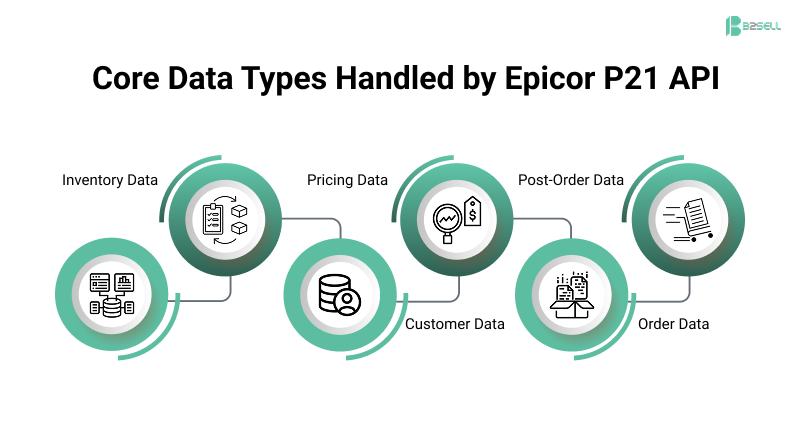
Product Data
- SKU
- Descriptions
- Categories
- Attributes
- Units of measure
- Status flags
Inventory Data
- Available quantity
- Warehouse stock
- Location levels
- Allocation status
Customer Data
- Account records
- Addresses
- Contacts
- Credit terms
- Account status
Pricing Data
- Contract pricing
- Tier pricing
- Customer pricing
- Break pricing
- Promotions
Order Data
- Order headers
- Line items
- Taxes
- Shipping
- Payment terms
Post-Order Data
- Shipment status
- Tracking numbers
- Invoices
- Order status updates
B2Sell Epicor P21 API integration supports structured handling of all these data groups.
Common Distributor Pain Points Without API Integration
Many Prophet 21 users face repeated operational problems when systems are not API-connected.
Inventory Mismatch
When stock updates are delayed:
- Ecommerce shows wrong availability
- Orders exceed stock
- Backorders increase
- Customer trust drops
Pricing Errors
Complex pricing rules in P21 are hard to copy into other systems manually.
This leads to:
- Wrong customer pricing
- Margin loss
- Quote disputes
- Manual overrides
Manual Order Processing
Without API order flow:
- Orders must be retyped
- Staff time increases
- Typing mistakes happen
- Processing slows
Fragmented Product Data
Without API sync:
- Product data differs by channel
- Descriptions vary
- Units mismatch
- Attributes are missing
How Epicor P21 API Integration Works — Step-by-Step Data Flow
This section explains the standard data flow model in simple terms. This structure is commonly used in B2Sell Epicor P21 API integration projects.
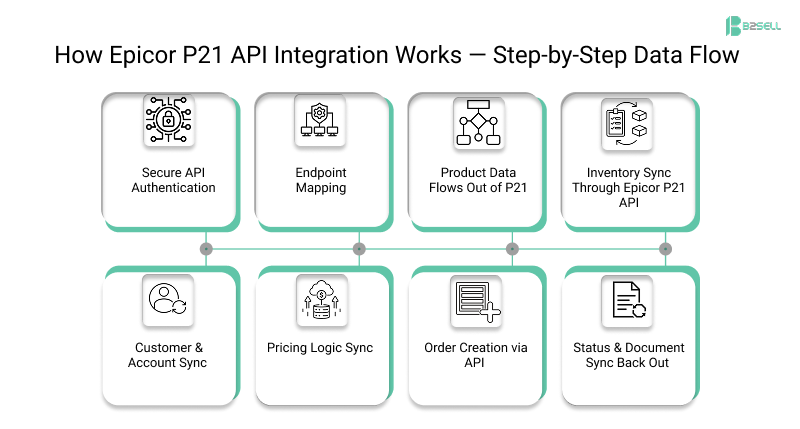
Step 1 — Secure API Authentication
Integration begins with secure access setup.
Authentication Includes
- API credentials
- Access tokens
- Permission scopes
- Role controls
Only approved systems can send or receive data.
B2Sell configures this layer with controlled access rules and audit tracking.
Step 2 — Endpoint Mapping
Each type of data has a defined API endpoint.
Think of endpoints as labeled doors for specific data.
Examples
- Product endpoint
- Inventory endpoint
- Customer endpoint
- Order endpoint
Each endpoint defines:
- Required fields
- Accepted formats
- Validation rules
B2Sell provides pre-mapped endpoint templates to reduce setup time.
Step 3 — Product Data Flows Out of P21
Product data is often the first sync.
Product Data Includes
- SKU
- Description
- Units of measure
- Categories
- Attributes
- Images (via PIM systems)
Flow example:
Prophet 21 → B2Sell API Layer → Ecommerce / PIM / Portal
The integration can run:
- On schedule
- On change trigger
- On request
Step 4 — Inventory Sync Through Epicor P21 API
Inventory updates are time-sensitive.
Inventory Flow
- Stock changes in P21
- API detects change
- Integration layer processes event
- Connected systems update quantity
Sync Frequency Options
- Near real-time
- Interval-based
- Trigger-based
B2Sell supports warehouse-level inventory mapping.
Step 5 — Customer & Account Sync
Customer records must stay aligned across systems.
Customer Sync Covers
- New accounts
- Address updates
- Contact records
- Terms updates
- Status flags
B2Sell Epicor P21 API integration includes customer validation checks to prevent duplicate accounts.
Step 6 — Pricing Logic Sync
Pricing is one of the most complex areas in Prophet 21.
Pricing API Handles
- Contract pricing
- Tier breaks
- Customer groups
- Quantity rules
B2Sell’s integration layer translates Prophet 21 pricing logic into ecommerce-ready pricing responses.
This avoids pricing mismatches across channels.
Step 7 — Order Creation via API
Orders from connected systems are sent directly into Prophet 21.
Order API Flow
External System → B2Sell API Layer → Prophet 21
Order Payload Includes
- Customer ID
- Items
- Quantities
- Prices
- Shipping data
- Notes
B2Sell applies validation rules before order submission to prevent failures.
Step 8 — Status & Document Sync Back Out
After order processing, updates flow outward.
Outbound Data Includes
- Order status
- Shipment confirmation
- Tracking numbers
- Invoice references
This keeps customer-facing systems updated without manual checks.
P21 Data Flow: What Actually Happens
When a customer places an order on your ecommerce site, here's the data journey:
Step 1: Order Capture
The storefront collects order details — products, quantities, customer ID, shipping address. This data sits in your ecommerce platform's database.
Step 2: API Call to P21
Your integration layer (middleware or direct connector) formats the order into P21's expected structure and sends it via REST API. Key fields:
- Customer account number (must exist in P21)
- Item IDs matching P21 SKUs
- Pricing confirmation (ecommerce price vs P21 price)
- Shipping method code
Step 3: P21 Validation
Prophet 21 checks:
- Is customer credit available?
- Is inventory in stock at the fulfillment location?
- Do item IDs exist and match?
If validation fails, P21 returns an error. Your integration must handle this gracefully — queue the order, notify someone, or reject it on the storefront.
Step 4: Order Creation
P21 creates the sales order and returns an order number. Your integration stores this reference for tracking.
Step 5: Inventory Adjustment
P21 decrements available inventory. If you're syncing inventory to your storefront, this triggers an update — either immediately (webhook) or on the next sync cycle (polling).
Sync Patterns: Real-Time vs Batch
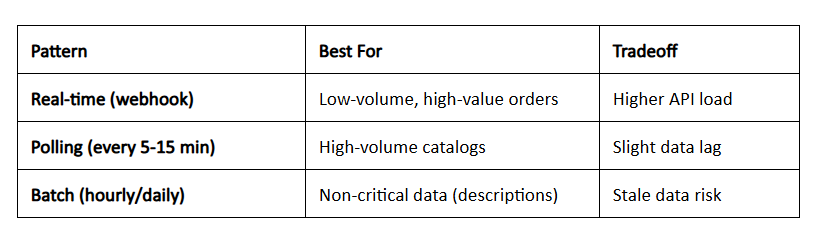
Most distributors use a hybrid: real-time for orders and inventory, batch for product data enrichment.
Error Handling That Actually Works
The P21 API will reject requests. Plan for:
- Timeout handling — P21 busy? Queue and retry.
- Duplicate detection — Order sent twice? Check before creating.
- Mismatch logging — Price in P21 ≠ price on site? Flag it.
A good integration logs every API call and response for debugging.
How B2Sell Epicor P21 API Integration Is Different
B2Sell offers a structured integration platform instead of one-off custom scripts.
More details here: Explore B2Sell Epicor P21 API
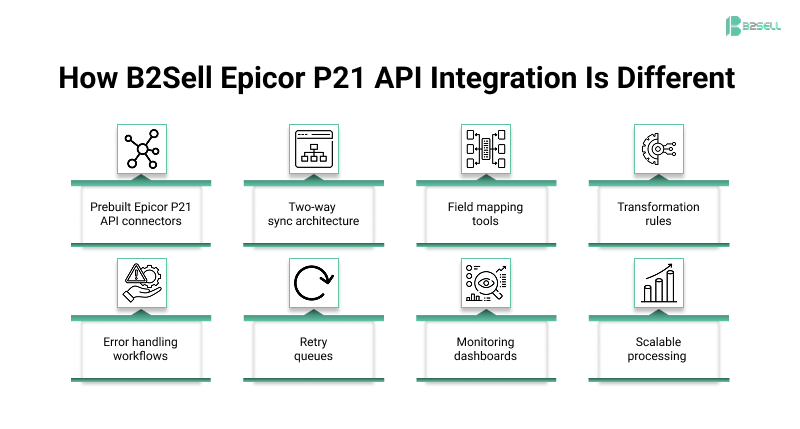
B2Sell Integration Capabilities
- Prebuilt Epicor P21 API connectors
- Two-way sync architecture
- Field mapping tools
- Transformation rules
- Error handling workflows
- Retry queues
- Monitoring dashboards
- Scalable processing
AI-Ready Integration Structure
AI search systems and automation tools work better when data is structured and consistent.
B2Sell Epicor P21 API integration supports AI-readiness by enabling:
- Clean structured product data
- Standardized attributes
- Consistent identifiers
- Real-time availability signals
- Unified pricing logic
This improves:
- AI search results
- Smart catalog tools
- Automated recommendations
- Intelligent reporting
Error Handling in B2Sell Epicor P21 API Integration
Reliable integration must expect failures and handle them safely.
Built-In Safeguards
- Automatic retry logic
- Failed record queues
- Validation filters
- Duplicate detection
- Logging and audit trails
- Alert notifications
This protects financial and order data.
Performance and Scalability Features
B2Sell Epicor P21 API integration is designed for distributor-scale workloads.
Performance Controls
- Batch processing options
- Queue-based processing
- Load balancing support
- Incremental sync logic
Scalability Benefits
- Handles large catalogs
- Supports high order volume
- Supports multi-warehouse data
- Supports multi-channel sync
Implementation Approach with B2Sell
A structured rollout improves success.
Recommended Implementation Phases
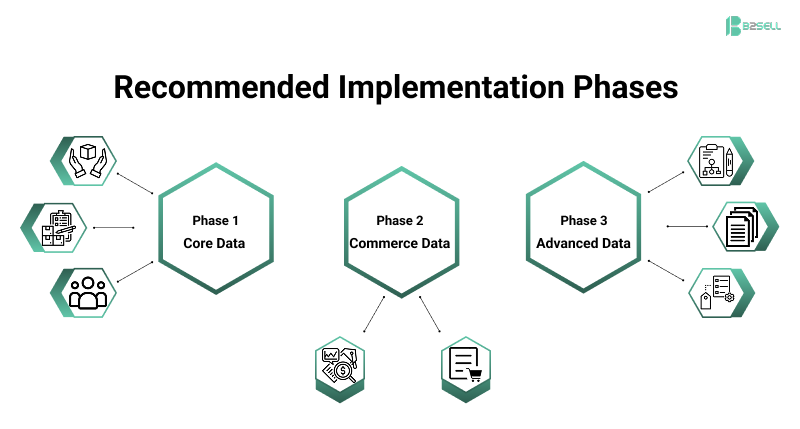
Phase 1 — Core Data
- Products
- Inventory
- Customers
Phase 2 — Commerce Data
- Pricing
- Orders
Phase 3 — Advanced Data
- Status
- Documents
- Extended attributes
B2Sell provides guided implementation models for each phase.
Best Practices for Epicor P21 API Projects
Define Data Ownership
Decide which system controls:
- Product master
- Pricing master
- Customer master
Use Field Mapping Rules
Document:
- Field formats
- Required fields
- Transform rules
Monitor From Day One
Enable:
- Sync dashboards
- Error alerts
- API logs
Avoid Direct Custom Scripts
Use structured integration layers like B2Sell instead of fragile custom code.
Learn More: Epicor P21 API Integration vs Traditional Methods - Click here
Conclusion — Why Structured Epicor P21 API Integration Matters
Disconnected systems create delays, errors, and manual work. Batch sync methods cannot support modern distributor workflows.
Epicor P21 API integration creates structured, secure, automated data flow between Prophet 21 and connected platforms. It improves accuracy, speed, and operational control.
B2Sell provides a purpose-built framework that simplifies Epicor P21 API integration with prebuilt connectors, safeguards, monitoring, and scalable architecture.
For distributors planning digital growth, API-driven integration is not optional — it is foundational.
Ready for the Next Step?
If you want reliable, scalable B2Sell's P21 API integration, explore the B2Sell integration framework and see how structured API data flow can modernize your operations.
Request a Demo | Book Strategy Call
If you want reliable, scalable B2Sell's P21 API integration, explore the B2Sell integration framework and see how structured API data flow can modernize your operations.
This deep dive covered the technical data flow. For the complete picture of P21 integration options and platform selection, read our Complete P21 API Integration Guide for Distributors → Click here
.png)
.png)
.png)


.png)