


Introduction: Why P21 Ecommerce Matters for Distributors Today
For many B2B distributors, P21 Ecommerce is no longer optional. Customers now expect the same easy buying experience they get from consumer sites—fast search, accurate pricing, real-time inventory, and self-service ordering.
But implementing ecommerce on top of Epicor Prophet 21 (P21) is not simple.
Distributors often struggle with:
- Unclear implementation steps
- Data sync issues between P21 and ecommerce
- Long timelines and rising IT costs
This guide gives you a clear, step-by-step P21 Ecommerce implementation roadmap. It covers the pre-integration checklist, timeline, tech stack, risks, success metrics, and how platforms like B2Sell P21 Ecommerce simplify the journey.
What Is P21 Ecommerce?
P21 Ecommerce connects your Epicor Prophet 21 ERP to your online store. It syncs data such as customer pricing, inventory, order history, invoices, and product details. This gives customers a real-time digital buying experience.
What P21 Ecommerce Typically Includes:
- Customer-specific pricing
- Real-time inventory across warehouses
- Online ordering with P21 rules
- Invoice history & PDF downloads
- Order tracking from P21
- Credit limits and payment terms
- Custom catalogs for different groups
This is not just a website. It is a digital extension of your ERP.
Why P21 Ecommerce Is Important for Modern Distributors
Today’s B2B buyers behave like B2C customers. They want fast answers without calling or emailing your team.
With P21 Ecommerce, customers can:
- See livestock
- Check accurate prices
- Place quick bulk orders
- Download past invoices
- Reorder in seconds
- Track shipments
For distributors, this results in:
- Fewer manual tasks
- Higher order accuracy
- More repeat purchases
- Lower customer service workload
- Better visibility into customer behavior
This is why P21 Ecommerce is no longer optional. It is essential.
Common Challenges Distributors Face Before Implementation
Most distributors face the same issues before they start their P21 Ecommerce project. Knowing these early helps reduce headaches later.
1. Product Data Problems
Bad product data slows every project.
Common issues include:
- Incomplete descriptions
- Outdated categories
- Missing images
- No standard naming format
- Unorganized attributes
2. Complex Pricing Structures
P21 may hold years of pricing logic:
- Contract pricing
- Customer-specific discounts
- Special price breaks
- Group-based rules
If not mapped correctly, customers may see wrong prices online.
3. Slow Data Sync
Batch sync causes delays in inventory accuracy.
Buyers lose trust when stock numbers online do not match real availability.
4. Custom Customer Rules
Distributors often serve many customer types:
- Contractors
- Dealers
- Retail partners
- Technicians
- Distributors
Each with different access and payment terms.
5. Limited Internal Resources
IT teams manage ERP upgrades, security, and support.
Ecommerce becomes an extra burden.
6. Fear of Downtime
Many worry that integration could break existing P21 workflows.
A structured roadmap prevents this.
Full P21 Ecommerce Implementation Roadmap (Expanded & Detailed)
Below is the extended roadmap with new sections, added detail, and expanded explanations.
1. Pre-Integration Checklist (Critical Foundation)
Before building anything, prepare your data, team, and processes.
.png)
A. Data Cleanup
- Fix product descriptions
- Add missing images
- Standardize categories
- Clean item codes
- Update attributes like size, brand, material
Pro Tip: Clean data early. It speeds up development and improves search performance.
B. Pricing Cleanup
- Check contract pricing accuracy
- Remove outdated price rules
- Verify discount logic
- Organize price groups
C. Business Rule Review
Define:
- Shipping policies
- Payment methods
- Order approval workflows
- Tax rules
- Credit limit logic
D. Technical Readiness
- Confirm Prophet 21 version
- Ensure API access
- Identify integration endpoints
- Document existing customizations
E. Team Preparation
- Assign a project manager
- Build a cross-department team
- Set a timeline
- Plan weekly check-ins
A strong pre-checklist can shorten your project timeline by 25% to 40%.
2. Build the Right Tech Stack
Your tech stack must support your business today and in the future.
Your Ecommerce Tech Stack Should Include:
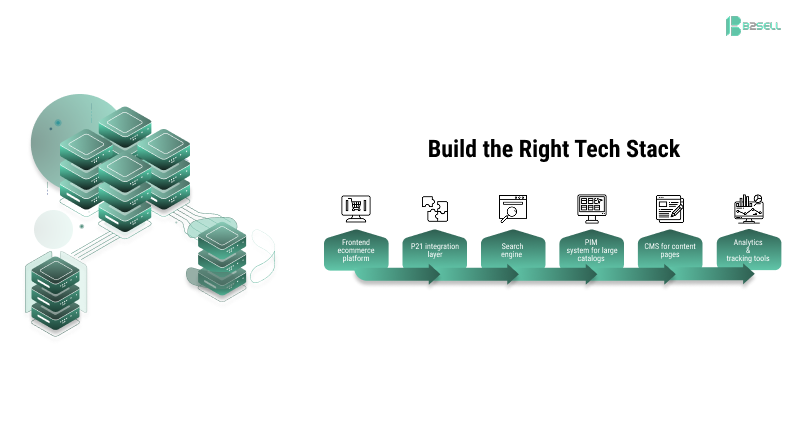
- Frontend ecommerce platform
(Magento, Shopify, BigCommerce, etc.)
- P21 integration layer
(connects storefront + P21)
- Search engine
- PIM system for large catalogs
- CMS for content pages
- Analytics & tracking tools
Why B2Sell Works Well:
It includes a native P21 connector, real-time sync, B2B workflows, and distributor-specific features.
3. Map P21 Data and Business Logic (High Impact Step)
This step reduces customer complaints and pricing disputes.
Map These Key Elements:
.png)
- Product feeds
- Warehouse-specific stock
- Multi-warehouse availability rules
- Customer-specific pricing
- Contract pricing
- Tax rules
- Shipping calculations
- Customer credit terms
- Quick order forms
- Reorder workflows
This mapping ensures your ecommerce store matches the offline experience.
4. Configure the Storefront (The Build Phase)
Now your ecommerce platform takes shape.
.png)
A. Catalog Setup
- Category structure
- Filters (brand, size, type)
- Detailed product pages
B. Customer Account Setup
- Role-based access
- Customer-specific catalogs
- Order history
- Invoice downloads
C. B2B Feature Setup
- Quick order
- Bulk ordering
- CSV upload
- Saved carts
- Contract pricing views
- Custom workflows
D. Mobile Optimization
Over 60% of B2B customers now browse from mobile.
Mobile-friendly pages increase adoption rate.
5. Integrate with P21 (Real-Time Sync)
This is the heart of the project.
What Must Be Synced in Real-Time:
%20(1).png)
- Orders
- Inventory
- Pricing
- Customer data
- Shipments
- Invoices
Real-Time vs Batch Sync
- Real-time: best for customer experience
- Batch: best for low-priority data
Real-time makes customers trust your store.
6. Testing & Quality Assurance (Zero Failures)
Testing is where you prevent errors at launch.
.png)
Functional Tests
- Price checks
- Stock checks
- Checkout process
- Filtering and search
Integration Tests
- Order flow from store to P21
- Invoice sync
- Shipment updates
- Customer account updates
Customer Testing (Most Important)
Ask 10–20 customers to try the site.
Collect real feedback.
7. Launch, Train, Monitor
Launch is the beginning, not the end.
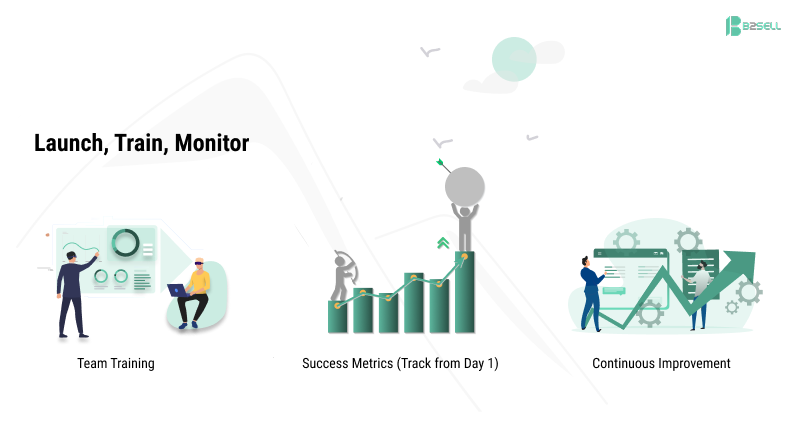
A. Team Training
Train:
- Sales team
- Customer service
- Warehouse team
- Accounting team
B. Success Metrics (Track from Day 1)
- Customer adoption rate
- Page load speed
- Search success rate
- Order accuracy
- Return rate
- Manual order entry reduction
- Support ticket drop
C. Continuous Improvement
- Improve search filters
- Add promotions
- Enable personalization
- Improve mobile UI
- Add PIM for richer product data
Key Benefits of P21 Ecommerce (With Metrics)
Operational Benefits
- 30–50% reduction in manual order entry
- Faster order cycles
- Fewer pricing disputes
Customer Experience Benefits
- 24/7 self-service ordering
- Real-time inventory visibility
- Easy reordering
Revenue Benefits
- Higher repeat purchases
- Increased average order value
- Better cross-sell visibility
Expanded Real-World Examples (More detail added)
Example 1: Distributor with 20,000 SKUs
Their product data was messy.
After cleaning data + adding PIM + P21 Ecommerce:
- Searches became 3x faster
- Online orders grew by 28%
- Manual price errors dropped by 90%
Example 2: Industrial Parts Distributor
They had complex pricing rules.
After mapping and syncing P21 rules:
- Customer complaints fell
- Average order value increased
- Service team workload reduced
Example 3: Multi-Warehouse Distributor
After real-time inventory sync:
- Customers saw warehouse-specific stock
- “Where is my order?” tickets dropped
- Order routing became faster
Key Benefits of a Structured P21 Ecommerce Implementation
When distributors follow a clear roadmap, they see real results.
1. Faster Launch (up to 40% quicker)
Customers complete orders in minutes instead of calling.
2. Fewer Errors
Real-time sync reduces pricing and inventory mistakes by up to 90%.
3. Better Customer Experience
Self-service tools improve customer repeat purchases.
4. Higher Revenue
Self-service increases orders and reduces effort.
5. Lower Support Load
Customers access invoices, orders, and shipments without calling.
6. Stronger Sales Team Productivity
Less time spent on manual order entry.
FAQ
What is P21 Ecommerce?
P21 Ecommerce is the process of connecting Epicor Prophet 21 to an online store so customers can place orders, check pricing, view inventory, and manage their account in real time.
How long does P21 Ecommerce take to implement?
Most distributors complete implementation in 8–16 weeks, depending on data readiness and complexity.
Do I need clean data for P21 Ecommerce?
Yes. Clean data improves search, pricing, and customer experience.
Can P21 Ecommerce handle contract pricing?
Yes. With the right integration, all contract pricing, group pricing, and special rules sync automatically.
What ecommerce platforms work with P21?
Magento, Shopify, BigCommerce, WooCommerce, and custom platforms—depending on your integration partner.
Why is real-time P21 sync important?
Real-time sync ensures customers always see accurate pricing, stock levels, and order history. It prevents errors and builds trust.
Conclusion: A Clear Roadmap Makes P21 Ecommerce a Game Changer
A well-planned P21 Ecommerce implementation transforms how distributors sell and serve customers.
With the right roadmap:
- Orders move faster
- Errors drop
- Customers buy more often
By using a purpose-built platform like B2Sell P21 Ecommerce, distributors reduce risk, shorten timelines, and achieve faster ROI.
Ready to Modernize Your P21 Ecommerce?
Want to launch P21 Ecommerce with less stress and faster results?
👉 Download the P21 Ecommerce Implementation Checklist -Click here
👉 Request a Demo of B2Sell P21 Ecommerce
Take the first step toward a faster, smarter distributor ecommerce experience.
.png)
.png)
.png)


.png)