


What Is P21 Catalog Automation?
P21 catalog automation is software that pulls product data directly from Epicor Prophet 21 and turns it into print catalogs, web catalogs, and mobile catalogs — with no manual data entry. It replaces hours of copy-paste work with a single sync. The catalog stays current because the source data in P21 stays current.
%202.png)
If you sell as a distributor, your catalog is your storefront. When prices change, when stock moves, when a vendor sends new images, your catalog needs to reflect that. Doing this by hand is slow. It also leads to mistakes that cost you orders.
This guide breaks down what P21 catalog automation does, how it works, what to look for in a tool, and the kind of results distributors see in the first 90 days.
See it in action: Book a free demo of catalog automation for P21 →
Why Manual Catalog Updates Hurt P21 Distributors
Most P21 distributors still update catalogs the old way. A team member exports product data to a spreadsheet. Someone else fixes the descriptions. A designer drops it into InDesign. Two weeks later, the catalog ships. By then, half the prices are already wrong.
Manual catalog work creates four real problems:
- Slow time to market. A new product can sit for weeks before customers see it.
- Wrong prices. Manual edits miss the latest price book changes in P21.
- Stock mismatches. Your catalog says "in stock" when your warehouse says otherwise.
- Channel drift. Your print catalog, website, and mobile app all show different data.
The cost is not just labor. It is lost trust. A buyer who orders something marked "available" and then waits three weeks is a buyer who tries your competitor next time.
For a distributor with 10,000 or more SKUs, manual catalog management can eat 200+ hours per quarter. That is one full-time person doing nothing but cleanup.
How P21 Catalog Automation Works (Step by Step)
.png)
The system has four moving parts. Here is how they fit together:
- Connect to P21. A REST API connector reads the item master, pricing, inventory, and customer-specific data straight from your Prophet 21 instance.
- Enrich the data. A Product Information Management (PIM) layer adds what P21 doesn't store well — long descriptions, multiple images, spec sheets, videos, attributes.
- Apply templates. You pick a layout for print, a layout for web, a layout for mobile. The system pours the data into each one.
- Publish everywhere. One click sends the updated catalog to your print vendor, your ecommerce site, your Amazon listing, and your dealer portals — at the same time.
The key word is dynamic. The catalog is not a static file you remake every quarter. It is a live view of your P21 data. Change a price in P21 today; your online catalog reflects it tonight.
This is what separates real catalog automation from "we exported a CSV and uploaded it." A CSV is a snapshot. Automation is a stream.
For deeper detail on the PIM layer that sits between P21 and your catalogs, see PIM for Prophet 21.
P21 Catalog Automation vs Manual Catalog Management
This is the comparison most distributors are actually trying to make. Here it is in one place.
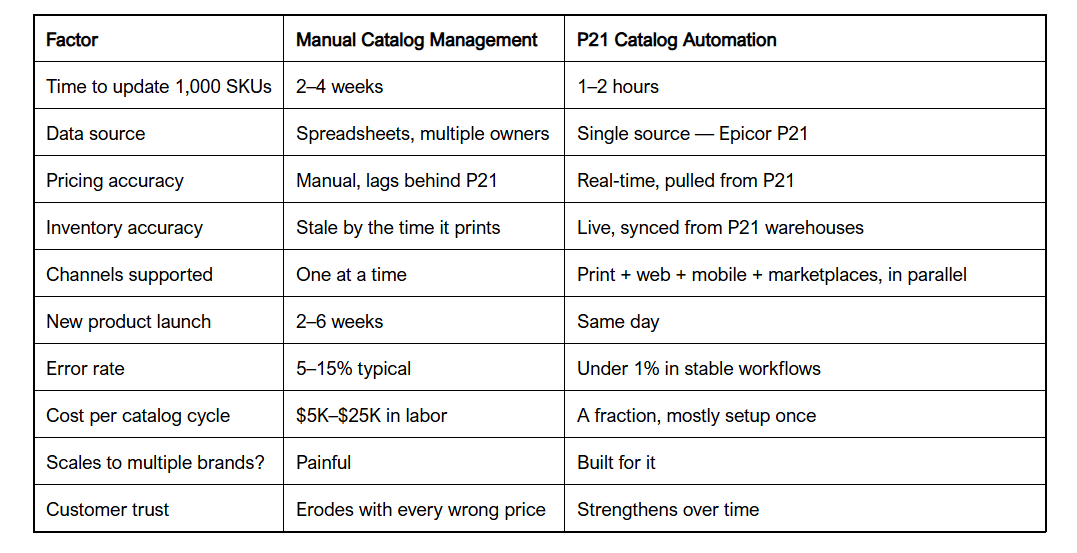
The table makes one thing clear. The manual approach is not "cheaper." It just hides the cost in payroll and in lost orders.
Ready to map out what automation looks like for your catalog? See B2Sell's P21 catalog automation solution →
Print + Web + Mobile: One Source, Every Channel
Most distributors don't sell on just one channel anymore. You have a print catalog for old-school buyers, a website for self-serve customers, a mobile app for field reps, and maybe a Shopify or Magento store too.
If every channel needs its own catalog file, you have a problem at scale. If every channel reads from the same automated source, you have a moat.
Here is how the channels typically break down:
- Print catalogs. B2Sell Output builds press-ready PDFs from your P21 data on a schedule.
- Web catalogs. B2B eCommerce for P21 pulls the same data into your online store.
- Mobile catalogs. Mobile apps for P21 give sales reps a live catalog in their pocket.
- Marketplaces. The same PIM publishes to Amazon, eBay, Walmart, and Facebook Marketplace.
One product update in P21. Every channel updates itself. That is the whole pitch.
This is why distributors who automate catalogs usually see their ecommerce conversion rate climb too. Better data on the storefront means buyers find what they need and trust what they see.
What to Look For in a P21 Catalog Automation Tool
Not every tool that claims P21 integration delivers real automation. Some are glorified spreadsheet syncers. When you evaluate vendors, push them on these seven points:
- Native P21 connector. A real REST API connection, not a nightly CSV export.
- Multi-warehouse inventory. Your catalog should reflect availability across all your locations.
- Customer-specific pricing. P21 contract pricing should flow through to logged-in buyers.
- PIM layer included. You need rich attributes, not just what P21 stores.
- Multi-channel publishing. Print, web, mobile, and marketplaces from one source.
- AI enrichment. Look for AI product enrichment to fill in missing descriptions and attributes automatically.
- Speed of deployment. A real tool goes live in weeks, not quarters.
If a vendor can't speak to all seven, they are selling you software your team will have to wrestle with. Catalog automation is supposed to remove work, not add it.
The AI piece matters more than people think. Most P21 item masters have 30–50% of products missing the attributes needed for a clean catalog. AI enrichment fills those gaps without a person doing it row by row.
How B2Sell Handles Catalog Automation for Epicor P21
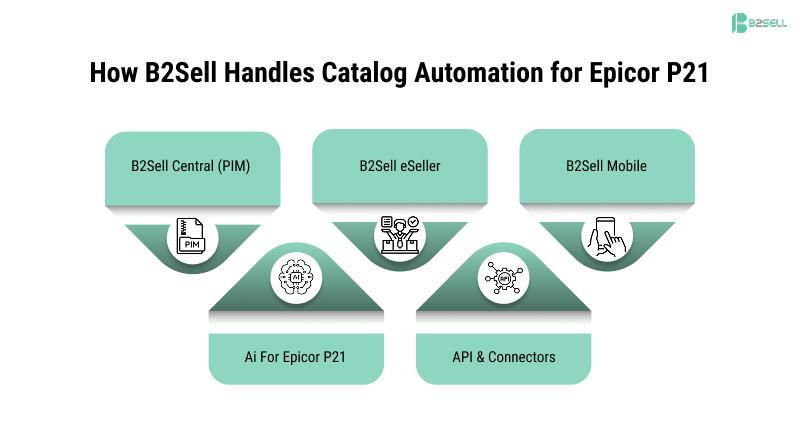
B2Sell built its platform specifically for P21 distributors. The Epicor P21 Solutions suite covers the whole stack — PIM, ecommerce, mobile, and catalog output — connected through one REST API to your P21 instance.
Here is what that looks like in practice:
- B2Sell Central (PIM) holds the enriched product data on top of your P21 item master.
- B2Sell Output generates print catalogs on demand or on a schedule.
- B2Sell eSeller runs your B2B and B2C ecommerce store from the same data.
- B2Sell Mobile gives reps and customers a native app catalog.
- AI for Epicor P21 handles cleanup, enrichment, and ongoing data quality work.
- API & Connectors push data to whatever else you run — Shopify, Magento, marketplaces.
The architecture matters because distributors don't replace systems; they layer on top of them. You keep P21 as your ERP. B2Sell becomes the layer that turns your P21 data into customer-facing experiences.
Real Results Distributors See After Automating
What changes after a distributor switches from manual to automated catalogs?
Based on typical implementations, here is what the first 90 days look like:
- Catalog refresh time drops from weeks to days. New products go live in hours.
- Pricing errors fall by 80–90%. P21 is the source of truth, so the catalog can't drift.
- Stock accuracy improves immediately. Real-time sync removes the "out of stock surprise."
- Product team time gets reclaimed. A team that spent 200 hours a quarter on cleanup spends maybe 30.
- Ecommerce conversion lifts 10–25%. Better data means fewer abandoned carts.
- Sales rep productivity rises. Reps in the field see real-time stock and pricing, close deals faster.
These are not theoretical numbers. They are the operational outcomes B2Sell implementations are built around for distributors in industrial supply, agricultural supply, electrical, plumbing, and specialty distribution.
The compounding effect is the part most people miss. A better catalog feeds better search results on your site. Better search lifts conversion. Higher conversion funds more enrichment. The flywheel takes about a quarter to start spinning. After that, your competitors who are still hand-keying spreadsheets cannot catch up.
How to Get Started in 30 Days
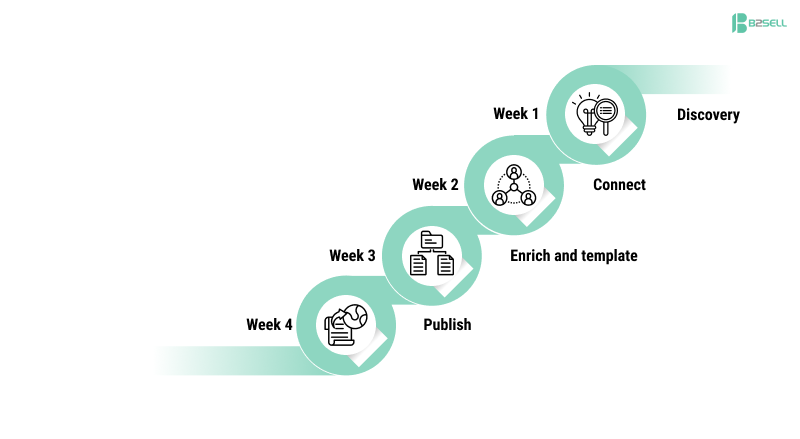
You do not need a 12-month transformation project. A typical P21 catalog automation rollout runs about four weeks:
- Week 1 — Discovery. Map your current catalog workflow. Identify which P21 fields feed which catalog sections. Pick a pilot product family.
- Week 2 — Connect. Stand up the REST API connection to P21. Pull the item master into PIM. Run data quality checks.
- Week 3 — Enrich and template. AI fills gaps in descriptions and attributes. Your team picks layouts for print and web.
- Week 4 — Publish. Generate the first automated catalog. Compare it side-by-side with the manual version. Sign off.
After week four, every new catalog is dynamic by default. Updates happen on a schedule. Your product team moves from data entry to data strategy.
The hardest part is usually not the technology. It is committing to P21 as the single source of truth. Once that decision is made, the rest is plumbing — and the plumbing already exists.
Frequently Asked Questions
What is P21 catalog automation?
P21 catalog automation is software that pulls product data directly from Epicor Prophet 21 and publishes it across print, web, mobile, and marketplace catalogs without manual data entry. It keeps every channel in sync with your ERP in near real time.
How is P21 catalog automation different from a regular PIM?
A PIM stores and enriches product content. P21 catalog automation adds the output layer — print, web, and mobile catalog generation — and a live two-way connection to Prophet 21. Most modern setups use both together, often from the same vendor.
Can P21 catalog automation handle customer-specific pricing?
Yes. A real P21 connector pulls contract pricing and customer-tier pricing live from Prophet 21, so each logged-in buyer sees their own price on every catalog channel.
Does catalog automation replace Epicor P21?
No. P21 stays as your ERP. Catalog automation sits on top, reads from P21, and pushes enriched, customer-ready data out to your storefronts and print catalogs.
How long does it take to implement P21 catalog automation?
Most distributors are live in 4–8 weeks. Discovery and the P21 API connection take the first two weeks. Enrichment, templating, and first publish typically wrap by week four.
What does P21 catalog automation cost?
Cost varies by SKU count, channels, and AI enrichment scope. Most distributors find that the labor savings on catalog work alone covers the platform cost within the first two to three quarters.
Will it work with multiple warehouses?
Yes. Multi-warehouse inventory is a core requirement. Your catalog should show stock by location, not a single aggregated number.
Can we still produce print catalogs with automation?
Absolutely. Print is still strong in distribution. A platform like B2Sell Output generates press-ready PDFs directly from your P21 data, so the print catalog stays in sync with the web catalog.
Ready to Stop Hand-Building Catalogs?
P21 catalog automation is no longer optional for distributors who want to compete on speed and accuracy. The cost of the manual approach shows up in wrong prices, slow launches, and buyers who quietly switch to a competitor with a cleaner storefront. The cost of automation shows up once, in setup — and then disappears into background savings every month after.
If you run Epicor Prophet 21 and your catalog is still a quarterly fire drill, you have a clear next move. See how B2Sell's P21 catalog automation platform connects your ERP to every channel you sell on, with PIM, print, web, mobile, and AI enrichment built in. 👉 Book a free demo with B2Sell →
.png)
.png)
.png)


.png)