


Introduction
If you're a B2B distributor managing thousands of SKUs across spreadsheets, ERP exports, supplier PDFs, and ecommerce platforms — you already know the pain.
Product descriptions that don't match between your website and catalog. Pricing updates that take days to propagate. Images stored in three different locations. Attributes missing from half your listings.
This isn't a technology problem you can solve with more spreadsheets. It's a product data architecture problem — and it's why distributors are adopting Product Information Management (PIM) software at an accelerating rate.
This guide covers everything you need to evaluate, select, and implement PIM for your distribution business: what it is, why it matters, what features to prioritize, and how it connects to your existing ERP and ecommerce systems.
What Is PIM Software?
Product Information Management (PIM) is a centralized platform that collects, enriches, validates, and distributes product data across every channel your business touches.
It serves as the single source of truth for every piece of product data, from specifications and pricing to images and digital assets.
Product names, descriptions, and marketing copy
Technical specifications and attributes
SKUs, UPCs, and manufacturer part numbers
Pricing (list, customer-specific, promotional)
Digital assets (images, datasheets, videos, CAD files)
Compliance and regulatory documentation
Translations for multi-language catalogs
Without PIM, this data lives in silos: your ERP has SKUs and pricing, your marketing team has descriptions in a shared drive, product images are scattered across vendor portals, and spec sheets arrive as email attachments.
PIM consolidates everything into one governed system — then pushes clean, consistent data to your ecommerce store, printed catalogs, marketplaces, mobile apps, and customer portals.
For an in-depth look at how this works for distributors specifically, see our guide: PIM for Distributors: How B2Sell Helps You Master Product Management.
Why Distributors Need PIM (More Than Manufacturers Do)
Manufacturers create products. Distributors aggregate them — sometimes tens of thousands of SKUs from hundreds of suppliers.
This creates unique challenges:
%20(1).png)
1. Data arrives in chaos
Every supplier sends product data differently. One vendor emails Excel sheets. Another posts CSVs to an FTP server. A third expects you to scrape their website. Formats, attributes, and naming conventions vary wildly.
PIM gives you a normalization layer: ingest data from any source, map it to your schema, validate it, and publish a consistent catalog.
2. Customers expect B2C-quality experiences
Your B2B buyers research products the same way they shop on Amazon. If your site has incomplete specs, missing images, or inconsistent pricing, they'll find a competitor who does it better.
PIM enables rich product content — detailed attributes, multiple images per SKU, downloadable datasheets — without manual data entry for each listing.
3. Multi-channel is the baseline
Distributors sell through their own ecommerce store, customer portals, mobile apps, Amazon Business, printed catalogs, and sales reps with pricing sheets. Every channel needs accurate, up-to-date product data.
PIM's multi-channel publishing pushes updates everywhere simultaneously. Change a price once, it's updated everywhere in minutes.
4. ERP is necessary but insufficient
Your ERP (whether Epicor P21, SAP Business One, or NetSuite) is the system of record for inventory, orders, and financials. But ERPs are terrible at managing marketing content, digital assets, and product attributes.
PIM complements your ERP — pulling core data (SKUs, inventory, pricing) and enriching it with everything commerce requires.
For more on how PIM specifically works with Prophet 21, see: PIM for P21: 2026 Guide to Centralized Product Data.
10 PIM Features Every Distributor Must Evaluate
Not all PIM systems are built for distribution. Many were designed for consumer brands with 500 SKUs and a single Shopify store. Distributors need industrial-grade capabilities.
Here's your evaluation checklist:
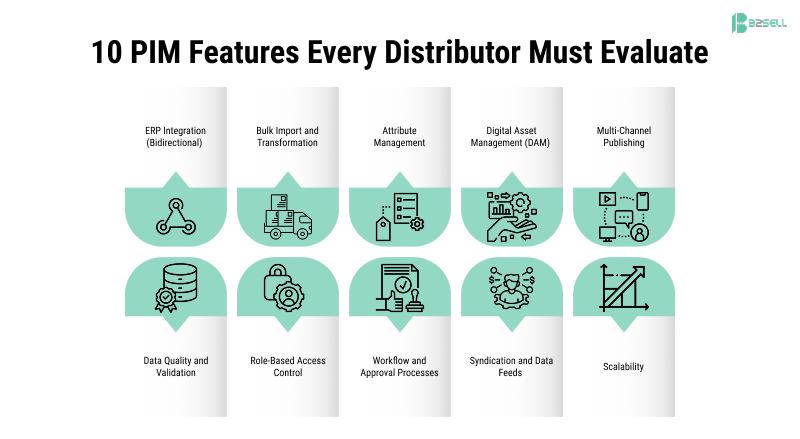
1. ERP Integration (Bidirectional)
Your PIM must sync with your ERP — pulling SKUs, pricing, and inventory inbound, and (optionally) pushing enriched data back. Native connectors for P21, SAP B1, and NetSuite are ideal.
2. Bulk Import and Transformation
Importing 50,000 SKUs from a supplier spreadsheet shouldn't take weeks. Look for flexible mapping tools, data transformation rules, and automated validation.
3. Attribute Management
Distributors need custom attribute schemas per product category. A fastener has different specs than an HVAC unit. Your PIM must handle complex, hierarchical attribute structures.
4. Digital Asset Management (DAM)
Built-in DAM means images, PDFs, and videos live alongside product data — not in a separate system. Essential for catalog production and ecommerce.
5. Multi-Channel Publishing
Push to Shopify, Magento, BigCommerce, Amazon, Walmart, and your mobile app from one platform. Native connectors beat CSV exports every time.
6. Data Quality and Validation
Automated rules that catch missing attributes, invalid data types, or incomplete listings before they hit your storefront. "Completeness scores" per product are invaluable.
7. Role-Based Access Control
Your marketing team edits descriptions. Your product managers approve specs. Your executives see reports. Permissions must be granular.
8. Workflow and Approval Processes
Products should move through stages: draft → review → approved → published. Audit trails for compliance-sensitive industries.
9. Syndication and Data Feeds
Generate feeds for marketplaces, Google Shopping, comparison engines, and partner portals. Custom formatting per channel.
10. Scalability
If you have 25,000 SKUs today and 100,000 in three years, your PIM must scale without degrading. Cloud-native architecture matters.
For a detailed breakdown of PIM capabilities across platforms, read: PIM Software: Centralized Product Information Management
PIM vs. ERP vs. MDM: What's the Difference?
These terms get confused constantly. Here's the clear distinction:

For most distributors, PIM is the right tool.
ERP handles operations. PIM handles commerce. MDM is typically best suited for large enterprises that need centralized governance of data across multiple business units, systems, and locations.
If someone tells you that your ERP "already has PIM functionality," ask them where the product images are stored, how you manage marketing descriptions, and whether you can push to Amazon from that system. The answer will clarify things quickly.
How PIM Integrates With Your Existing Stack
A well-implemented PIM becomes the hub of your product data architecture:
Inbound (Data Sources):
ERP → SKUs, inventory, pricing, customer-specific pricing
Suppliers → Product specs, images, datasheets
Internal teams → Marketing copy, custom attributes
Outbound (Channels):
Ecommerce (Shopify, Magento, BigCommerce)
Marketplaces (Amazon, Walmart, eBay)
Mobile apps
Print catalogs
Customer portals
Sales team tools (pricing sheets, configurators)
The key is bidirectional sync with your ERP. When a new SKU is created in P21 or SAP B1, it should appear in your PIM automatically. When inventory changes, your ecommerce store should reflect it in real time.
This is where many generic PIM vendors fail. They weren't built for ERP-centric environments. They expect product data to originate in the PIM, not the ERP.
B2Sell Central was built specifically for this architecture — native integration with Epicor P21 and SAP Business One, with bidirectional sync that treats your ERP as the system of record.
For platform-specific integration details:
PIM for Magento: Optimize Product Data Easily
Shopify PIM: Manage & Distribute Product Data Easily
PIM Implementation: Timeline and Best Practices
A realistic PIM implementation for a mid-sized distributor (10,000-50,000 SKUs) takes 8-16 weeks:
Weeks 1-2: Discovery and Data Audit
Inventory all product data sources
Assess data quality and completeness
Define attribute schemas by category
Map ERP fields to PIM structure
Weeks 3-4: System Configuration
Configure PIM to match your catalog structure
Build ERP integration (API or file-based)
Set up user roles and workflows
Weeks 5-8: Data Migration
Import existing product data
Cleanse, normalize, and enrich
Validate against quality rules
Weeks 9-12: Channel Configuration
Connect ecommerce platforms
Configure marketplace feeds
Test publishing workflows
Weeks 13-16: Training and Go-Live
Train product managers and marketing teams
Run parallel operations
Go live and monitor
Common pitfalls to avoid:
Underestimating data cleansing effort (it always takes longer)
Skipping attribute schema design (you'll rebuild it later)
Not involving IT early (ERP integration needs their input)
Going live without training (adoption fails)
Calculating ROI on PIM Investment
PIM ROI comes from three buckets:
1. Time Savings (Labor Cost Reduction)
Reduced manual data entry for new products
Faster supplier onboarding
Automated channel publishing vs. manual updates
Example: If updating 100 products across 3 channels takes 10 hours manually, and PIM reduces that to 1 hour, you're saving 9 hours per update cycle.
2. Revenue Gains (Improved Conversion)
Higher ecommerce conversion from better product content
Reduced cart abandonment from accurate inventory display
More searchable products (better SEO, better on-site search)
Example: Improving product page completeness from 60% to 95% can increase conversion rates by 15-30%.
3. Error Reduction (Cost Avoidance)
Fewer returns from incorrect product information
Reduced customer service inquiries about specs
Avoided marketplace penalties from data quality violations
For a mid-sized distributor doing $10M in ecommerce, a 1% improvement in conversion rate = $100K additional revenue.
When Is the Right Time for PIM?
You likely need PIM now if:
✅ You manage more than 5,000 active SKUs
✅ Product data lives in multiple disconnected systems
✅ Channel updates take days or weeks
✅ You're planning ecommerce expansion (new platforms, marketplaces)
✅ Data quality issues cause customer complaints or returns
✅ Your team spends more time on data entry than selling
You can probably wait if:
❌ You have fewer than 1,000 SKUs with simple attributes
❌ You sell through a single channel
❌ Product data rarely changes
For most distributors at the $5M+ revenue mark with active ecommerce ambitions, PIM has moved from "nice to have" to "competitive requirement."
B2Sell Central: PIM Built for Distributors
B2Sell Central is a Product Information Management system purpose-built for B2B distributors and manufacturers using Epicor P21 or SAP Business One.
Unlike generic PIM platforms designed for consumer brands, Central was engineered for:
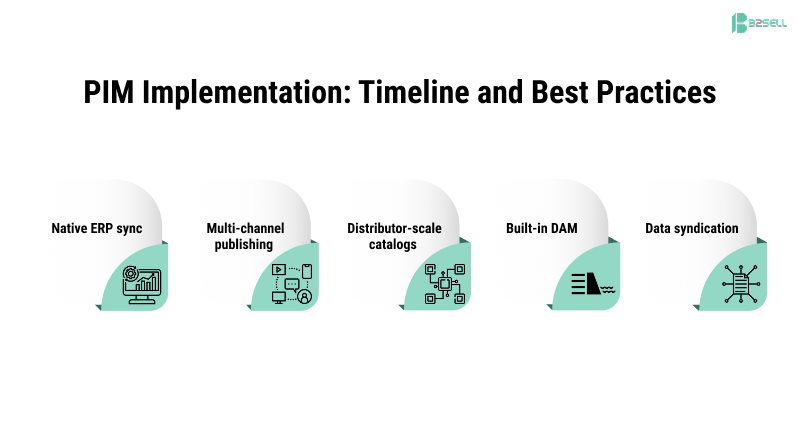
Native ERP sync — Bidirectional integration with P21 and SAP B1, not bolted-on connectors
Multi-channel publishing — Push to Shopify, Magento, BigCommerce, Amazon, Walmart, and mobile apps
Distributor-scale catalogs — Handle 50,000+ SKUs with complex attribute schemas
Built-in DAM — Images, PDFs, and videos managed alongside product data
Data syndication — Generate feeds for marketplaces and partner portals
If you're currently managing product data in spreadsheets while your competitors launch B2C-quality ecommerce experiences, Central closes that gap — without requiring you to replace your ERP or retrain your operations team.
Schedule a demo to see how Central connects to your existing systems.
Frequently Asked Questions
How is PIM different from my ecommerce platform's product management?
Your Shopify or Magento backend manages products for ONE channel. PIM manages products for ALL channels — including platforms, marketplaces, print, and mobile — from a single source.
Does PIM replace my ERP?
No. PIM complements your ERP. Your ERP remains the system of record for inventory, orders, and financials. PIM handles product content, digital assets, and commerce-specific data.
How long does PIM implementation take?
8-16 weeks for most mid-sized distributors. The biggest variable is data quality — if your product data is already clean and structured, implementation moves faster.
What's the typical cost of PIM software?
Cloud PIM solutions range from $500/month for entry-level to $5,000+/month for enterprise. Implementation services typically equal 1-2x the first year's software cost.
Can PIM help with Amazon and marketplace selling?
Yes. PIM generates optimized product feeds for Amazon, Walmart, eBay, and other marketplaces — with channel-specific formatting and attribute mapping.
Ready to centralize your product data?
B2Sell Central gives distributors the PIM capabilities of enterprise platforms — with native ERP integration for Epicor P21 and SAP Business One.
Related Resources
PIM for Distributors: How B2Sell Helps You Master Product Management
PIM for Distributors: The Complete 2026 Guide
PIM for P21: 2026 Guide to Centralized Product Data
PIM for Manufacturers: Why It Matters in 2026
PIM for Magento: Optimize Product Data Easily
.png)
.png)
.png)


.png)